


Developers are best suited to building application monitoring features. On the Microsoft platform, that means building Management Packs complete with a Service and Health Model.
Models and Modeling are hardly the terms you equate with the Information Technology industry. Yet, modeling is exactly what you need to learn to build Management Packs for Microsoft Operations Manager 2007. Microsoft’s new holistic model-centric approach is a complete departure from the server-centric ways of Operations Manager 2005 (MOM).
In this article, I’m going to build a simple management pack from the ground up and show how application instrumentation and modeling come together to monitor the health of your Enterprise Applications.
System Center Operations Manager 2007 Overview
A complete introduction to Operation Manager is beyond the scope of this article, so I’m just touching on the basics. For a complete introduction, see the Resources section at the end of this article.
If you’ve ever built a web application, desktop application, or connected an application to a server database, you know the health of your application is contingent on the servers and databases hosting or connected to your application. For example: Your web application may be online, but if the database the application is connected to is corrupted, your whole application is effectively offline.
Operations Manager monitors the health of the distributed components of your application spanning the client, server, and even the network; tying everything together in dashboard-like views. Figure 1 depicts the components of Operations Manager.
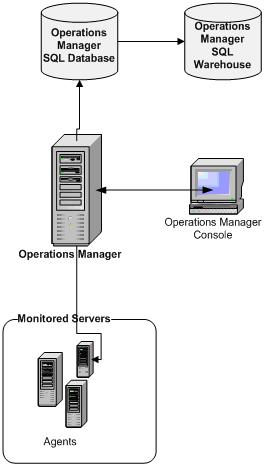
Figure 1: Operations Manager Architecture
As you can see, parts of Operations Manager exist on the system being monitored and parts exist on the Operations Manager server. An Agent Service runs on any machine being monitored by Operations Manager.
Ops Manager sends instructions to the Agents running on a monitored machine. Instructions normally consist of things like gather specific events in the event log or periodically sample specific data from Windows Management Instrumentation. The events or readings are sent back to the Ops Management server and, based on the information, Ops Manager raises alerts or simply stores the information.