


Recently, I created a SQL Server Management tool for mobile devices, Siccolo, that allows me to manage SQL Servers by using web services hosted on public domain. (See more information on the Siccolo web site about how to develop a mobile management tool: developing Siccolo—a mobile management tool.)
As a part of the management tool, I needed to show some information about selected NT Service, such as the path to the service executable. For example, services.msc shows it like this:
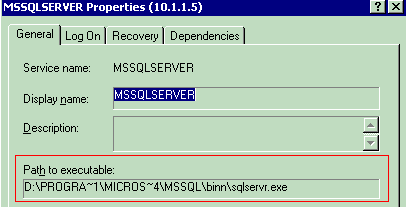
In my mobile management tool, I needed to display in in a similar manner:

The code presented retrieves information about Path to Executable for selected NT Service.
Background (Optional, but Needed)
My “managing” web service is hosted under SSL with “Integrated Windows” authentication set. Therefore, a mobile application is required to pass network credentials. This is needed for remote access to get information from the Registry on the remote machine.
Using the Code
Components used:
- serviceprocessor.asmx.cs: Web service interface
- NTServiceInfo.cs: A small “wrapper” to retrieve NT Service information
.NET provides just the tool for this task, the System.ServiceProcess.ServiceController class. To create an instance of System.ServiceProcess.ServiceController, do the following:
// C# //
…
System.ServiceProcess.ServiceController Service;
if (this.m_MachineName!=””)
   {Service = new ServiceController(this.m_ServiceName,
                                    this.m_MachineName ) ;}
else
{Service = new ServiceController(this.m_ServiceName ) ;}
…
The fact that authentication (Integrated Windows authentication or Basic) is in place on IIS actually helps here. To be able to access service(s) on the different machine than the web service host, the web service needs to “assume” the identity of an authenticated user. Normally, the web service is running under an ASP.NET user with minimum privileges; I needed to impersonate an authenticated user with the web service.
On the server side, to retrieve authenticated user, you need to use System.Web.Services.WebService.User and then impersonate: The code does just that—”Impersonates the user represented by the WindowsIdentity object.”
// C# //
…
System.Security.Principal.WindowsImpersonationContext
   impersonationContext;
   impersonationContext =
      ((System.Security.Principal.WindowsIdentity)User.Identity).
      Impersonate();
…
To retrieve the path to the executable, you can look under HKEY_LOCAL_MACHINE\SYSTEM\CurrentControlSet\Services, find the selected service, and get “ImagePath”:

To read the value of a Registry key (on the remote machine, or on the local machine):
private string ReadRegestryKey(string RegistryKey,
                               out string ErrorInfo)
{
   try
   {
      string Value=””;
      ErrorInfo =””;
      RegistryKey Key;
      RegistryKey KeyHKLM = Registry.LocalMachine;
      try
      {
         if (this.m_MachineName !=”” )    //open on remote machine
            Key = Microsoft.Win32.RegistryKey.OpenRemoteBaseKey(
               RegistryHive.LocalMachine, this.m_MachineName
                  ).OpenSubKey(RegistryKey);
         else
            Key = KeyHKLM.OpenSubKey(RegistryKey);
         Value = Key.GetValue(“ImagePath”).ToString();
         Key.Close();
      }
      catch (Exception ex_open_key)
      {
         ErrorInfo = “Error Accessing Registry
            [” + ex_open_key.ToString() + “]”;
         return “”;
      }
      return Value;
   }
   catch (Exception ex_read_registry)
   {
      ErrorInfo =   ex_read_registry.Message;
      return “”;
   }
}