


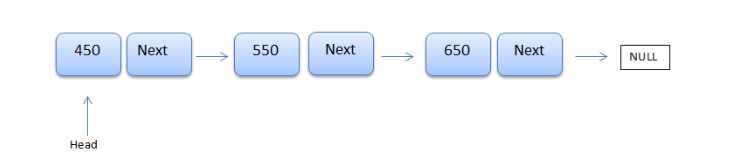
C# linked lists contain a linear collection of objects called ‘nodes’, which are stored at random memory locations. The first node in the list is a special node known as head, which points to the first element of the list. In the last part of the list, the node may either point to null or it may point to a special node called tail.
In this programming tutorial, we will learn how to use linked lists in C# and .NET, providing code examples along the way.
Read: Best Bug Tracking Software for C# Developers
C# Nodes in Linked Lists
Note that a node in a linked list is an object that contains two fields; one stores data and the other holds the address of the immediate next node.
What is a Generic
In simple terms, generics allow a developer to use any data type while working with a class or method.
What is a Singly Linked List in C#?
A singly linked list in C# is forward-oriented. That means when a programmer navigates through a list, they can only traverse in one direction. A node in a singly linked list contains its value and the reference of the next node.
Important Notes about Linked Lists in C#
The following are some key notes developers should keep in mind when working with linked lists in C# and .NET software development:
- Linked lists use memory dynamically
- The LinkedList class implements the ICollection, IEnumerable, and ISerializable interfaces
- Removal and reinsertion of nodes can be done in the same list or in another list
- Programmers can store duplicate elements in a C# linked list, provided they are of the same type
- Each node in a generic LinkedList object is of the type LinkedListNode
- Linked lists in C# supports enumerators
- The capacity of a LinkedList is defined as the number of elements it can hold
- Linked lists do not support chaining, splitting, or cycles, making the list safe for inconsistent states
Constructor Methods for C# Linked Lists
C# provides different constructor methods to make writing code more efficient while working with linked lists. Here is a list of C# constructor methods and what they are used for:
- LinkedList(): Initializes a new instance of the LinkedList class
- LinkedList(IEnumerable): Initialize a new instance of the LinkedList class, which contains elements copied from the specified
IEnumerable - LinkedList(SerializationInfo, StreamingContext): Initializes a new instance of the LinkedList class, which can be serialized with the specified SerializationInfo and StreamingContext context
You can learn more about constructors in our tutorial: Introduction to Constructors in C#.
Generic Singly Linked List in C# Code Example
To better understand how singly linked lists in C# work, let’s examine a code example. In this scenario, a generic singly linked list is used to store and retrieve elements using a for each loop:
using System;
using System.Collections.Generic;

public class MyClass
{
    public static void Main(string[] args)
    {
        var listOfNames = new LinkedList();
        listOfNames.AddLast("Rigby Deirdre");
        listOfNames.AddLast("Cymone Ashlee");
        listOfNames.AddLast("Rylee Shelley");
        listOfNames.AddLast("Elaine Teresa");
        listOfNames.AddFirst("Emmanuel Kourtney");     //adding to the first index

        //   Retrieving list elements
        foreach (var name in listOfNames)
        {
           Console.WriteLine(name);
        }
    }
}
Running this code produces the following output:
Emmanuel Kourtney
Rigby Deirdre
Cymone Ashlee
Rylee Shelley
Elaine Teresa
As you may have anticipated, the output list contains Emmanuel Kourtney at the very first location because we added it using the AddFirst() method; the elements added with AddLast() are added at the next subsequent locations of the list.
For our second scenario, let’s consider another code example of the generic list above, in which we instead add the elements before and after a specific node:
using System;
using System.Collections.Generic;

public class MyClass
{
    public static void Main(string[] args)
    {
        var listOfNames = new LinkedList();
        listOfNames.AddLast("Rigby Deirdre");
        listOfNames.AddLast("Cymone Ashlee");
        listOfNames.AddLast("Rylee Shelley");
        listOfNames.AddLast("Elaine Teresa");

        // Inserting a new element before "Rylee"
        LinkedListNode node= listOfNames.Find("Rylee Shelley");
        listOfNames.AddBefore(node, "Ken Heath");
        names.AddAfter(node, "Denton Atkinson");

        //  Iterating list elements
        foreach (var name in listOfNames)
        {
            Console.WriteLine(name);
        }
    }
}
Here is the output:
Rigby Deirdre
Cymone Ashlee
Ken Heath
Rylee Shelley
Denton Atkinson
Elaine Teresa
Here, we got the same output, as expected. Ken Heath is added to the list before, and Denton Atkinson is added after, the specific node Rylee Shelley. We accomplished this using the two methods – AddAfter() and AddBefore(), respectively.