


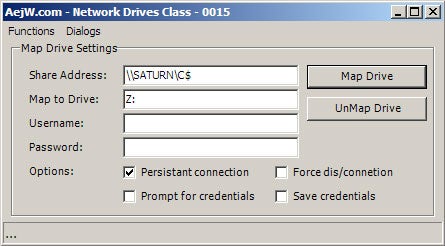
What It Does
This is a class for interfacing with the Windows Map Network Drive APIs.
Background/Description
This class was originally written to aid me during a contract for writing a startup automation application on Windows 2000. Since then, it has been used or tested with Windows XP, XP64 2003, and Vista beta2. The class was structured around some C++ MSDN documents/examples of the network API. Although there are plenty of other methods for mapping a network drive, I chose this method because it gives me the ability to report errors back to the application and provides access to the various network options.
Introduction to the Class
Getting started
Add the class file “cNetworkDrives0015.cs” to your project/solution. Add the “using” definition to your form, and so forth.
using aejw.Network;
Example: Mapping a network drive
NetworkDrive oNetDrive  = new aejw.Network.NetworkDrive();
try{
   oNetDrive.LocalDrive = “m:”;
   oNetDrive.ShareName  = “\\ComputerName\Share”
   oNetDrive.MapDrive();
}catch(Exception err){
   MessageBox.Show(this,”Error: “+err.Message);
}
oNetDrive = null;
Example: Unmapping a network drive
NetworkDrive oNetDrive = new aejw.Network.NetworkDrive();
try{
   oNetDrive.LocalDrive = “m:”;
   oNetDrive.UnMapDrive();
}catch(Exception err){
   MessageBox.Show(this,”Error: “+err.Message);
}
oNetDrive = null;
Username and Password Functions
The following examples require the object/class to be declared.
cNetworkDrive oNetDrive = new cNetworkDrive();
Mapping a network drive
- Map drive with current user credentials
oNetDrive.LocalDrive = "m:"; oNetDrive.ShareName = "\\ComputerName\Share1" oNetDrive.MapDrive(); - Map drive with specified user credentials
oNetDrive.LocalDrive = "m:";
oNetDrive.ShareName  = "\\ComputerName\Share1"
oNetDrive.MapDrive("Bob_Username","Bob_Password");
oNetDrive.LocalDrive = "m:";
oNetDrive.ShareName  = "\\ComputerName\Share1"
oNetDrive.PromptForCredentials = true;
oNetDrive.MapDrive();
oNetDrive.LocalDrive = "m:";
oNetDrive.Persistent = true;
oNetDrive.SaveCredentials = true;
oNetDrive.ShareName = "\\ComputerName\Share1"
oNetDrive.MapDrive("Bob_Username","Bob_Password");Unmapping a network drive
- Unmap a network connection
oNetDrive.LocalDrive = "m:"; oNetDrive.ShareName = "\\ComputerName\Share1" oNetDrive.UnMapDrive(); - Unmap a network connection ignoring network related errors
oNetDrive.LocalDrive = "m:";
oNetDrive.Force      = true;
oNetDrive.ShareName  = "\\ComputerName\Share1"
oNetDrive.UnMapDrive();
Other functions
- Display windows connection dialog
oNetDrive.ShowConnectDialog(this); //Display windows disconnection dialog oNetDrive.ShowDisconnectDialog(this); - Restore all persistent connections
oNetDrive.RestoreDrives();
History
10th August 2006: build0017
- Corrected persistent bug in demo application when unmapping drive.
11th May 2006: build0017
- Cleaned and optimised code.
14th May 2004: build0015
- LocalDrive and ShareName are now properties.
- Dialog functions now use a form object instead of a window handle.
- Renaming scheme for public functions and properties, MapNetworkDrive(...) is now MapDrive(...), and so on.
- Added Persistant option. Used to reconnect a drive at logon.
- Added SaveCredentials option. Allows windows to remember the user credentials when reconnecting a persistent connection.
- Added Force option, for MapDrive calls. If a drive is connected, it will disconnect that drive and then reconnect to the new share.
- Added PromptForCredintals option, for MapDrive calls. Windows will ask for a username and password to use with the connection.
- Added RestoreDrives function that restores persistent connections.
30th April 2004: build0012
- Code refinements and tidying, added comments to the class.
27th April 2004: build0011
- Adjusted declare tags, tidied class and article.
26th April 2004: build0010
- First version posted online.