


Introduction
The European Article Number, or EAN, is a standard European barcode which is designed to encode the identification of a product and its manufacturer and is a superset of the American standard, UPC. The format of the EAN13 barcode encodes a string of 12 characters followed by a 13th character which acts as the control number and is calculated through a formula based on the first 12 characters.
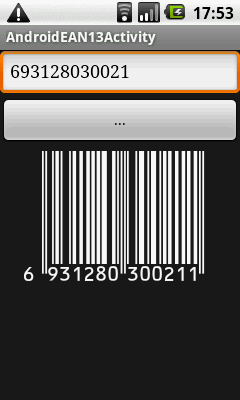
Nowadays, barcodes are used everywhere. If you earn a living as a programmer, sooner or later the need of support of barcodes in your applications will come up. For example, it may be supermarket bonus system, where user is identified by barcode from his phone to get discount, or such payment systems as Starbucks moble payment network. In this article will be explained how to generate EAN13 barcodes on Android screen.
The Russian version of this article can be found at http://plaincodesource.blogspot.com/2011/02/android-ean13.html
EAN13 Calculation Basics
EAN13 barcode uses a 12 digits product code, the thirteenth digit is a control number, which is calculated on the basis of first 12 digits. Calculation of control number ( digits numbered from right to left ) looks like this:
- P1 = the sum of even digits
- P2 = the sum of odd digits
- Z = P1 + 3 * P2
- R = the number divisible by 10 immediately superior to Z
- Control number = R – Z
Next, let’s see on EAN13 encoding system:
- The first digit is not encoded
- Each 6 following digit is encoded according to the first digit
- The 6 last digits are converted by the strict rule
| First digit | Left 6 digits | Right 6 digits |
| 0 | LLLLLL | RRRRRR |
| 1 | LLGLGG | RRRRRR |
| 2 | LLGGLG | RRRRRR |
| 3 | LLGGGL | RRRRRR |
| 4 | LGLLGG | RRRRRR |
| 5 | LGGLLG | RRRRRR |
| 6 | LGGGLL | RRRRRR |
| 7 | LGLGLG | RRRRRR |
| 8 | LGLGGL | RRRRRR |
| 9 | LGGLGL | RRRRRR |
Encoding for the digits:
| Digit | L – code | G – code | R – code |
| 0 | 0001101 | 0100111 | 1110010 |
| 1 | 0011001 | 0110011 | 1100110 |
| 2 | 0010011 | 0011011 | 1101100 |
| 3 | 0111101 | 0100001 | 1000010 |
| 4 | 0100011 | 0011101 | 1011100 |
| 5 | 0110001 | 0111001 | 1001110 |
| 6 | 0101111 | 0000101 | 1010000 |
| 7 | 0111011 | 0010001 | 1000100 |
| 8 | 0110111 | 0001001 | 1001000 |
| 9 | 0001011 | 0010111 | 1110100 |