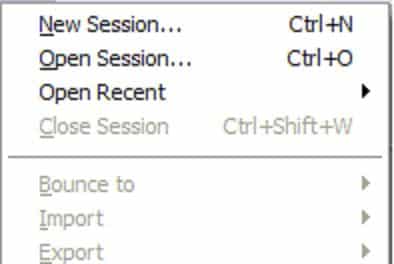
I was looking for info on how to do some custom drawing with respect to the submenu arrow recently, only to find that each question about it went unanswered. So, because I have solved the problem much to my liking, I would like to share the solution with whomever might find it useful. My goal was to simply make disabled custom drawn submenus have disabled looking submenu arrows, but there seemed to be no obvious way to do this. In finding a solution, I also found a way to simply do custom submenu drawing if that is what you want to do also.
First, start with the owner draw handling code:
LRESULT CMyMenuClass::MyDrawMenuItem(MSG &iMsg)
{
   LRESULT result = 0;

   DRAWITEMSTRUCT *dis = (DRAWITEMSTRUCT*)iMsg.lParam;
   HDC hDC = dis->hDC;

   if(dis->CtlType == ODT_MENU)
   {
      CMyMenuItem *menuItem = (CMyMenuItem*)dis->itemData;
      RECT textR            = dis->rcItem;
      bool isSubmenu        = menuItem->IsSubmenu();
      bool isEnabled        = menuItem->IsEnabled();

      //Draw custom submenu arrow
      if(isSubmenu)
      {
         HBITMAP hBitmap = (HBITMAP)::LoadImage(NULL,
            MAKEINTRESOURCE(OBM_MNARROW), IMAGE_BITMAP, 0, 0,
            LR_DEFAULTSIZE | LR_SHARED);
         BITMAP bm;
         ::GetObject(hBitmap, sizeof(BITMAP), (LPSTR) &bm);
         RECT arrowR  = textR;
         textR.right -= bm2.bmWidth;
         arrowR.left  = textR.right;
         int arrowW   = (arrowR.right - arrowR.left);
         int arrowH   = (arrowR.bottom - arrowR.top);
         ::DeleteObject(hBitmap);

         //Center the arrow rect vertically
         if(arrowH > bm2.bmHeight)
         {
            int offsetH   = (bm2.bmHeight - arrowH) / 2;
            arrowR.top   += offsetH;
            arrowR.bottom = arrowR.top + bm2.bmHeight;
         }

         //Draw the arrow
         this->MyDrawMenuArrow(hDC, arrowR, isEnabled);
      }

      //Do your custom menu drawing here
      this->MyDrawMenuItem(menuItem, textR);
   }

   RECT tmpR = dis->rcItem;
   ::ExcludeClipRect(hDC, tmpR.left, tmpR.top, tmpR.right,
                     tmpR.bottom);
}
So in the function above, start with the last line of code first. This call basically is what stops the OS from drawing the submenu item for you, so now you will have a “clear” palette to work with. In the section pertaining to the submenu drawing, I retrieve the submenu and enabled flags that I stored with each item during menu creation in the item’s data (code not shown). If the item is a submenu, I calculate the proper arrow rect (taking note to shorten the text rect also so there will be no overlap), and then pass that rect, along with the output HDC and the enabled state, into my draw arrow function.
In the draw arrow function, you could do anything you want to customize the submenu arrows, so if you wanted to do something non-OS looking, here is where you do that. I just wanted to have an OS look, but specific functionality that is, for some reason, not available.
Here is my draw arrow function:
void CMyMenuClass::MyDrawMenuArrow(HDC inHDC, RECT &inDestR,
                                   bool inIsEnabled)
{
   //Create the DCs and Bitmaps we will need
   HDC arrowDC = ::CreateCompatibleDC(inHDC);
   HDC fillDC  = ::CreateCompatibleDC(inHDC);
   int arrowW  = inDestR.right - inDestR.left;
   int arrowH  = inDestR.bottom - inDestR.top;
   HBITMAP arrowBitmap    = CreateDIBBitmap(inHDC, arrowW, arrowH);
   HBITMAP oldArrowBitmap = (HBITMAP)::SelectObject(arrowDC, arrowBitmap);
   HBITMAP fillBitmap     = CreateDIBBitmap(inHDC, arrowW, arrowH);
   HBITMAP oldFillBitmap  = (HBITMAP)::SelectObject(fillDC, fillBitmap);

   //Set the offscreen arrow rect
   RECT tmpArrowR;
   ::SetRect(&tmpArrowR, 0, 0, arrowW, arrowH);

   //Draw the frame control arrow (The OS draws this as a black on
   //                              white bitmap mask)
   ::DrawFrameControl(arrowDC, &tmpArrowR, DFC_MENU, DFCS_MENUARROW);

   //Set the arrow color
   HBRUSH arrowBrush = inIsEnabled ? ::GetSysColorBrush(COLOR_MENUTEXT) :
                                     ::GetSysColorBrush(COLOR_GRAYTEXT);

   //Fill the fill bitmap with the arrow color
   ::FillRect(fillDC, &tmpArrowR, arrowBrush);

   //Blit the items in a masking fashion
   ::BitBlt(inHDC, inDestR.left, inDestR.top, arrowW, arrowH, fillDC,
            0, 0, SRCINVERT);
   ::BitBlt(inHDC, inDestR.left, inDestR.top, arrowW, arrowH, arrowDC,
            0, 0, SRCAND);
   ::BitBlt(inHDC, inDestR.left, inDestR.top, arrowW, arrowH, fillDC,
            0, 0, SRCINVERT);

   //Clean up
   ::SelectObject(fillDC, oldFillBitmap);
   ::DeleteObject(fillBitmap);
   ::SelectObject(arrowDC, oldArrowBitmap);
   ::DeleteObject(arrowBitmap);
   ::DeleteDC(fillDC);
   ::DeleteDC(arrowDC);
}
In the function above, CreateDIBBitmap is just a utility function I wrote; it’s used to create a compatible DIB bitmap. You can use whatever method you prefer to create your bitmap.
I decided that, because I just wanted a simple arrow, I would stick to using DrawFrameControl. For me, making sure that I could use the disabled color was the most important thing, and to my dismay, state flags have no effect on how the submenu item is drawn. Basically, the documentation states that it will just create a black on white mask for you, and that is it. If I wanted to take it to the next level, I might check for a theme, and use theme drawing if applicable.
Here is what the disabled submenu arrows look like afterwards: