


Introduction
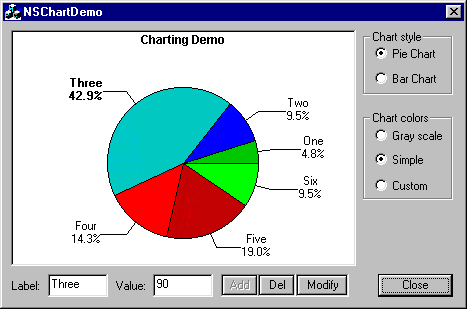
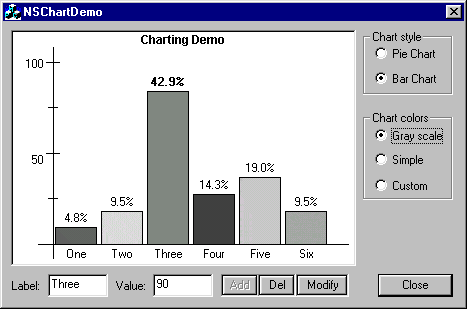
The CNSChartCtrl control class is derived from CWnd. The purpose is to create pie and bar charts in a dialog (also in a view) with editable fill colors and values in runtime. Originally, the source code and project was written and compiled with Visual C++ 6.0 SP5 under Windows 98; it also was run in later versions.
It is an alternative to many tools available that perform similar tasks.
How to Use the Class
- To create a new NSChart control, use the MS Visual C++ dialog editor, insert a custom control on the dialog, and set "MFC_NSChartCtrl" as the Class name. The caption field is used to set the title of chart.
- Create an instance of CNSChartCtrl in the dialog class:
- Subclass the class member with the control in InitDialog():
- Initialize the control colors and add the elements in the InitDialog() function, if any,
- Run!
#include "NSChartCtrl.h"
...
CNSChartCtrl m_chart;
m_chart.SubclassDlgItem(IDC_CUSTOM1,this);
m_chart.PrepareColors(CNSChartCtrl::GrayScale);    //Colors
m_chart.AddValue(10,"One");
m_chart.AddValue(20,"Two");
m_chart.AddValue(90,"Three");
m_chart.AddValue(30,"Four");
m_chart.Addvalue(40,"Five");
m_chart.AddValue(20,"Six");
Currently, two groups of pre-established colors exist: SimpleColos and GrayScale… you can customize this.
Customizing Colors and Patterns
The NSChart control uses an array of patterns to fill the sectors and bars. To add a new pattern or color, use AddSolidBrush(COLORREF) or AddBrush(COLORREF).
m_chart.ResetColors();
m_chart.AddSolidBrush(0x000000FF);
m_chart.AddSolidBrush(RGB(255,0,255));
m_chart.AddBrush(m_pBrush);    // pre-created brush
Using the Notify Code for Selection Items
The NSChartCtrl notifies you when you have clicked in one sector or bar (according to the case) with information about the selected value. The notify code is NSCS_SELECTEDITEM.
For use, it needs to add the necessary code: Declare the function that will be called from ON_NOTIFY in the AFX_MSG block.
class CYourDialog : public CDialog
{
   ...
      //{{AFX_MSG(CYourDialog)
      ...
      afx_msg void OnChartSelectedItem(NMHDR* pNMHDR, LRESULT* pResult);
      ...
      //}}AFX_MSG
   ...
};
void CYourDialog::OnChartSelectedItem(NMHDR* pNMHDR, LRESULT* pResult)
{
   LPNMCHARTCTRL nmchart = (LPNMCHARTCTRL)pNMHDR;
   if(nmchart->iItem >= 0 )
   {
      //... have selected item
   }
   *pResult = FALSE;
}
Declare the notify message in MESSAGE_MAP block:
BEGIN_MESSAGE_MAP(CYourDialog, CDialog )
   //{{AFX_MSG_MAP(CYourDialog)
   ...
   ON_NOTIFY(NSCS_SELECTEDITEM, IDC_CUSTOM_CTRL, OnChartSelectedItem)
   ...
END_MESSAGE_MAP()
If the control is created in a CView, change IDC_CUSTOM_CTRL with 0.
History
1.0.1 25 Jun 2004
– Initial release.
1.1.0 02 Aug 2004
– Fix some painting problems.
– Added HitTest().
– Added ModifyItem().
– Added DeleteItem().
– Added Notify Messages
Any comments or suggestions are welcome.