


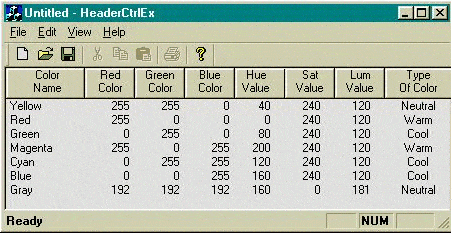
First of all I have to mention that Alon Peleg helped me find the solution to the problem so I feel it is only fair that his name will be mentioned as an author.
On a recent project we did I had to make the header control of a CListCtrl multiline. This small project show how to do it by subclassing the CHeaderCtrl of the CListCtrl.
If you want to use this code just the HeaderCtrlExt.h and HeaderCtrlExt.cpp files into your source code.
In addition on your CListView or CListCtrl derived class add a member variable of type CHeaderCtrlEx and a member variable of type CFont.
If you are using a CListCtrl without a view then put the following code in the end of the OnCreate handler of the CListCtrl:
///////////////////////SET UP THE MULTILINE HEADER CONTROL
//m_NewHeaderFont is of type CFont
m_NewHeaderFont.CreatePointFont(190,"MS Serif");

CHeaderCtrl* pHeader = NULL;
pHeader=GetHeaderCtrl();

if(pHeader==NULL)
   return;

VERIFY(m_HeaderCtrl.SubclassWindow(pHeader->m_hWnd));

//A BIGGER FONT MAKES THE CONTROL BIGGER
m_HeaderCtrl.SetFont(&m_NewHeaderFont);

HDITEM hdItem;

hdItem.mask = HDI_FORMAT;

for(i=0; i < m_HeaderCtrl.GetItemCount(); i++)
{
   m_HeaderCtrl.GetItem(i,&hdItem);

   hdItem.fmt|= HDF_OWNERDRAW;

   m_HeaderCtrl.SetItem(i,&hdItem);
}
If you are using a CListView or any class derived by it then add the following code in the OnInitialUpdate override of the CListView:
///////////////////////SET UP THE MULTILINE HEADER CONTROL
//m_NewHeaderFont is of type CFont
m_NewHeaderFont.CreatePointFont(190,"MS Serif");

CListCtrl& ListCtrl = GetListCtrl();

CHeaderCtrl* pHeader = NULL;
pHeader=ListCtrl.GetHeaderCtrl();

if(pHeader==NULL)
   return;

VERIFY(m_HeaderCtrl.SubclassWindow(pHeader->m_hWnd));

//A BIGGER FONT MAKES THE CONTROL BIGGER
m_HeaderCtrl.SetFont(&m_NewHeaderFont);

HDITEM hdItem;

hdItem.mask = HDI_FORMAT;

for(i=0; i<m_HeaderCtrl.GetItemCount(); i++)
{
   m_HeaderCtrl.GetItem(i,&hdItem);

   hdItem.fmt|= HDF_OWNERDRAW;

   m_HeaderCtrl.SetItem(i,&hdItem);
}
The only difference between the two parts of code is way we get a pointer to the Header control.
That’s it. Enjoy!!!