


Introduction
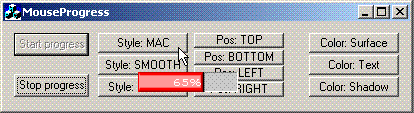
This article introduces a mouse progress control that follows the mouse. The solution is based on global Windows hooking and it uses a DLL that is dynamically imported to the application.
Background
I have created several applications and utils that process a lot of information. Usually, it is time consuming and the users have to wait. I used to create a popup window with a progress bar to indicate the wait time; sometimes the GUI itself contained the progress. After a search for a better solution, someone suggested that I set the mouse cursor with the hourglass. The hourglass is a good idea, but I wanted it to show a progress bar.
I tested two solutions for the “problem.” The first solution was 100 mouse cursors that contained the mouse and a progress bar. That solution did work, but several users complained about their “fancy” cursor, so I changed to my dull cursor-look. The second solution was to hook the system and create an owner draw progress control that followed the mouse. That resulted in this article.
I’m just finishing a new version of SizeMe; the music mode part of the program takes a while because it reads each MP3-file ID-tag, indexes it, sorts it, and then groups it. That process takes time and the user had to have some feedback on that. Because SizeMe has a clean GUI, I thought this would be a great idea. That is the main reason I created this control in the first place, but, hey, I love to share.
Layout
I’m more of a programmer than a designer. But, I did create two out of three designs in this control. Here are the three flavors:
| Design | Sample | Description |
|---|---|---|
| Smooth |  |
This style looks like the default progress control with the PBS_SMOOTH option turned on. It is plain looking and it is possible to add a “percent” text on top of it. |
| Mac |  |
This style is sooo good looking. The idea and design were originally by Paul M. Meidinger (“Macintosh-like Progress Control”). It uses degrades of the selected colors. Also, here is it possible to add a percent on top of it. |
| Round |  |
This little puppy is my “masterpiece.” Inspired by the Mac-control and some progress bars I saw in games, I decided to create a round-looking progress bar. It is possible to customize on which angle it should start and end, plus the width of the progress fillings. |
Using the Code
The Mouse progress class uses a DLL that sets a system-wide hook. That does not mean that you need to add the .lib-file to the project because the DLL is dynamically loaded. To implement the code into your existing project, you only need to add these files:
- MousePrg.cpp
- MousePrg.h
- MousePrgVars.h
- MousePrgHook.h
And copy the MousePrgHook.dll file to where the executable file is.
You should create the class on the heap and delete it when you’re finished. (Remember, because it uses a hook, the DLL will load into each program that is active after execution, and it does not need to be active when not in use!) A typical usage of it could be like this:
//Class defs
CMousePrg *pMProgress;
//(...)

//When you start a time-consuming process (this is an MFC example;
//on Win32, you usually have the instance/hwnd handles)
pMProgress = new CMousePrg(AfxGetInstanceHandle(),
   this->GetSafeHwnd());
//(...)

//While you are moving along processing your stuff
pMProgress->SetPercent(nPercent);

//Delete the progress when you're finished.
if(bFinished==TRUE)
{
   delete pMProgress;
   pMProgress=NULL;
}
//(...)
The CMousePrg class inits the hook and start drawing the progress. It will show until you delete the object. It is meant to be that way, so you are “forced” to delete the class and the hook get detached. (Many hooks might slow things down, I guess).