


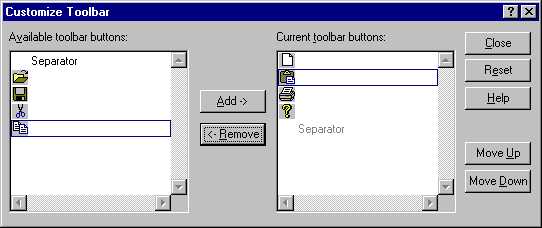
Make a Customized ToolBar Dialog Work in MFC (VC6)
Am I the only fool in this world? I searched the Web, posted questions on newsgroups, but found nothing and nobody answered me. It seems everybody knows how to do this except me. The customize toolbar dialogue either goes by with a flash or I could not add buttons back after they were deleted.
MSDN said you must answer several Notify messages. They are TBN_QUERYINSERT, TBN_QUERYDELETE, and TBN_GETBUTTONINFO, but there is no code showing how to do it.
I finally found the way after having a detailed look at the structure of CToolBarEx. It’s simple but I don’t know why nobody posts it.
Here is the way to accomplish the task:
- Let the wizard make a standard MFC .exe, create a menu—let’s call it “Customize ToolBar”—and use the wizard to create a hndle in CFrameWindow. In the handle, write:
- Add a handler to TBN_QUERYINSERT in the frame windows. In the Mainfrm.h file, add
afx_msg void QueryInsert(NMHDR * pNotifyStruct, LRESULT * result);In the Mainfrm.cpp file’s message map, add
ON_NOTIFY(TBN_QUERYINSERT,AFX_IDW_TOOLBAR,QueryInsert)Also, in the Mainfrm.cpp file, add:
void CMainFrame::QueryInsert(NMHDR * pNotifyStruct, LRESULT * result ) { *result = TRUE; }Now, because the frame windows will answer the TBN_QUERYINSERT message, the Customize ToolBar dialog knows you are allowing the ToolBar change. You see that, when you click the “Customize ToolBar” menu, the dialog appears, but you cannot delete any button. Neither can you add any button except the separator. Why? Because there is no handler for TBN_QUERYDELETE in the frame window.
- Add a handler to TBN_QUERYDELETE in the frame window; that’s the same code as adding TBN_QUERYINSERT. That’s shown here:
- How we get it to answer TBN_GETBUTTONINFO? We need collect all the toolbar button info before the dialog appears. Okay, let’s do it after the frame windows create the toolbar.
We add a private function in the frame window, and add two members into frame windows to save the info and the count of how many buttons you have in your CToolbar.
In the frame windows Mainfrm.h file, add the function:
private: void GetToolbarButtonInfo();Also, add the members:
TBBUTTON m_TBinfo[256]; // suppose you have a toolbar // button maxed to 256 int m_iTBCount;In the Mainfrm.cpp file, add:
void CMainFrame::GetToolbarButtonInfo() { CToolBarCtrl& myTBCtrl = m_wndToolBar.GetToolBarCtrl(); //get how many toolbar buttons you have when the frame loads m_iTBCount = myTBCtrl.GetButtonCount(); //save loaded toolbar button info into a m_TBinfo array for (int i=0; i<=m_iTBCount; i++) { myTBCtrl.GetButton(i,&m_TBinfo[i]); } }We call GetToolbarButtonInfo() right after the toolbar was created in the CFrameWnd:: OnCreate(…).
if (!m_wndToolBar.CreateEx(this, TBSTYLE_FLAT, WS_CHILD | WS_VISIBLE | CBRS_TOP | CBRS_GRIPPER | CBRS_TOOLTIPS | CBRS_FLYBY | CBRS_SIZE_DYNAMIC) || !m_wndToolBar.LoadToolBar(IDR_MAINFRAME)) { TRACE0("Failed to create toolbar\n"); return -1; // fail to create } GetToolbarButtonInfo();(You see, we did not add a parameter of CCS_ADJUSTABLE, but the toolbar is still adjustable.)
- Now, we have the Toolbar information to answer the TBN_GETBUTTONINFO. Let’s add the handler into the frame window:
CToolBarCtrl& myTBCtrl = m_wndToolBar.GetToolBarCtrl();
myTBCtrl.Customize();
Compile and link, run the .exe, and then click the “Customize ToolBar” menu option; this makes the Customize dialog flash when you click the “Customize ToolBar” menu option. That’s because your frame window has no answering handler to the message of TBN_QUERYINSERT.
afx_msg void QueryDelete(NMHDR * pNotifyStruct,
                         LRESULT * result);
ON_NOTIFY(TBN_QUERYDELETE,AFX_IDW_TOOLBAR,QueryDelete)
void CMainFrame::QueryDelete(NMHDR * pNotifyStruct,
                             LRESULT * result )
{
   *result = TRUE;
}
Now, you see you could ‘Remove’ (delete) the button, but after that you could never get it back, even when you click ‘Add’. Why? Actually, before the button adds back, the dialog sends another message—TBN_GETBUTTONINFO—to the frame window to search the button info you choose. If there is no info reply, there is no way to add back the button. So, we need the third handler for TBN_GETBUTTONINFO.
In Mainfrm.h, add:
afx_msg void QueryInfo(NMHDR * pNotifyStruct,
                       LRESULT * result);
In Mainfrm.cpp, add:
ON_NOTIFY(TBN_GETBUTTONINFO,AFX_IDW_TOOLBAR,QueryInfo)
void CMainFrame::QueryInfo(NMHDR * pNotifyStruct,
                           LRESULT * result )
{
   TBNOTIFY* pTBntf = (TBNOTIFY *)pNotifyStruct;

   if((pTBntf->iItem>=0) && (pTBntf->iItem <= m_iTBCount))
   {
      pTBntf->tbButton = m_TBinfo[pTBntf->iItem];
      *result = TRUE;
   }

   else
   {
      *result = FALSE;
   }
}
Compile, link, and run it. Does it work now?