Enhance MFC Applications with Preview and Thumbnail Support | CodeGuru

Enhance MFC Applications with Preview and Thumbnail Support

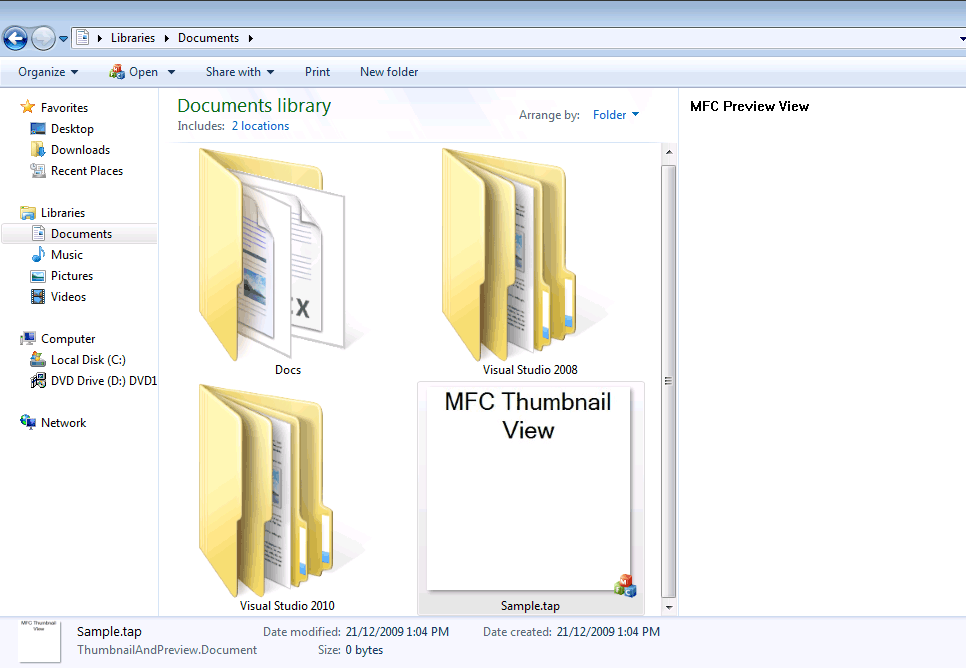
Introduction Figure 2. AppWizard Settings with Thumbnail and Preview Support Conditional compilation directives mean that the thumbnail generation code is not actually included in the main executable. The default implementation for the thumbnail-rendering method generated by the AppWizard is: void CXXXDoc::OnDrawThumbnail(CDC& dc, LPRECT lprcBounds) { // Modify this code to draw the document’s data dc.FillSolidRect(lprcBounds, […]

Written By
CodeGuru Staff
CodeGuru Staff
Jan 26, 2010
1 minute read
CodeGuru content and product recommendations are editorially independent. We may make money when you click on links to our partners. Learn More

Introduction


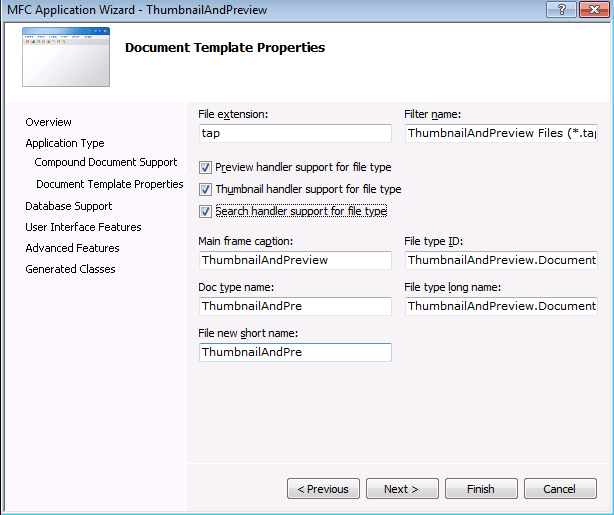
Figure 2. AppWizard Settings with Thumbnail and Preview Support

Conditional compilation directives mean that the
thumbnail generation code is not actually included in the
main executable. The default implementation for the
thumbnail-rendering method generated by the AppWizard
is:

  void CXXXDoc::OnDrawThumbnail(CDC& dc, LPRECT lprcBounds)
  {
   // Modify this code to draw the document’s data
   dc.FillSolidRect(lprcBounds, RGB(255, 255, 255));
   CString strText = _T(“TODO: implement thumbnail drawing here”);
   LOGFONT lf;
   CFont* pDefaultGUIFont = CFont::FromHandle(
    (HFONT) GetStockObject(DEFAULT_GUI_FONT));
   pDefaultGUIFont->GetLogFont(&lf);
   lf.lfHeight = 36;
   CFont fontDraw;
   fontDraw.CreateFontIndirect(&lf);
   CFont* pOldFont = dc.SelectObject(&fontDraw);
   dc.DrawText(strText, lprcBounds, DT_CENTER | DT_WORDBREAK);
   dc.SelectObject(pOldFont);
  }

The COM interface required for thumbnail support is
IThumbnailProvider, and this has a single
method called GetThumbnail that requires
implementation. GetThumbnail is implemented
within the MFC CDocument class, and after some device
context preparation code,
CDocument::GetThumbnail will call through to
the virtual OnDrawThumbnail method that is
shown above. Windows Vista and Windows 7 supports thumbnails
of up to 256 by 256 pixels, so there is actually a quite
large rendering area available in some circumstances. By
default, Windows will not render the thumbnail for a
document below a size of 20 by 20 pixels, but this can be
customized by a registry entry at HKEY_CLASSES_ROOT |
.fileextension | ThumbnailCutoff. ThumbnailCutoff is a
DWORD, with cut-off size ranging from 0 (32×32) to 3
(16×16).

CodeGuru Logo

CodeGuru covers topics related to Microsoft-related software development, mobile development, database management, and web application programming. In addition to tutorials and how-tos that teach programmers how to code in Microsoft-related languages and frameworks like C# and .Net, we also publish articles on software development tools, the latest in developer news, and advice for project managers. Cloud services such as Microsoft Azure and database options including SQL Server and MSSQL are also frequently covered.

Property of TechnologyAdvice. © 2026 TechnologyAdvice. All Rights Reserved

Advertiser Disclosure: Some of the products that appear on this site are from companies from which TechnologyAdvice receives compensation. This compensation may impact how and where products appear on this site including, for example, the order in which they appear. TechnologyAdvice does not include all companies or all types of products available in the marketplace.