


This is a lightweight class that prints EAN13 barcodes. It displays captions for the manufacturer and product descriptions as well as the numerical representation of the code.
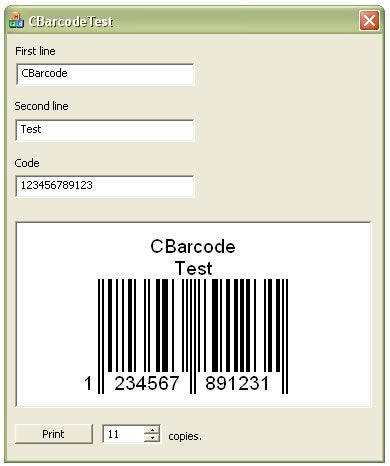
All initialisation is performed in the following constructors:
CBarcode(CString strCode, CString strText, UINT nNum);
CBarcode(CString strCode, CString strText, CWnd* pWnd);
Parameters
The parameters are self-explanatory:
- strCode takes a 12-digit numerical string
- strText takes a newline-separated string that contains both the company and the product captions
- nNum specifies the number of labels to be printed
- pWnd takes a pointer to a window into which to draw the image
Under the Bonnet
- If you are using the printing constructor, the class initialises the default printer on the system, determining the maximum width and height of the printable area based on your defaults in printer settings.
- The drawing constructor fits the image of the barcode into the client rectangle of the supplied window object.
- The barcode lines, font size, and margins are all calculated from the above.
- The code parses the 12-character code into the appropriate EAN13 format.
- Finally, depending on the constructor, the code either starts the printing process, looping nNum times, or simply draws the image into the client area of the window.
Advertisement
Credits
I outright stole and modified the ConvertToDigitPatterns() function I found on the Net (wtitten in C# by rainman_63). The rest of the code is ‘home-grown.’
Usage
- Do the inclusion:
#include "CBarcode.h" - Construct the CBarcode object, e.g.:
CBarcode bc(L"0123456789123", L"My Company\nThe product", 5);or:
CBarcode bc(L"0123456789123", L"My Company\nThe product",
            GetDlgItem(IDC_SOMEWINDOW));
References
This site gives quite an insight into EAN13 and other barcode structures and standards: http://www.activebarcode.com/codes/ean13.html