


I decided I needed a combination Groupbox and Checkbox control.
I jumped right in and started writing one. When I bogged down, I went looking to see whether anyone else had tried this. After examining Ming Liu’s code from his article “CGroupCheck – Checkbox associated with a groupbox,” I solved my problems. I owe him a debt of gratitude for paving the way for me, although I took a different approach to the problem.
Here is an example dialog using my CGroupCheckBox control:
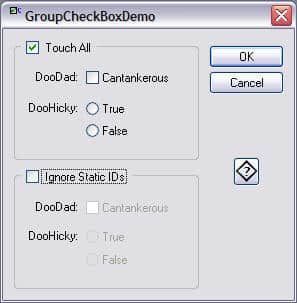
Clicking the checkbox enables/disables all controls that lie wholly within the groupbox. The parent dialog treats the control as a checkbox.
Styles
Notice the above dialog contains two styles of CGroupCheckBox. The one labeled Touch All enables/disables all of its contained controls and is created by default. The other, labeled Ignore Static IDs, enables/disables only those controls whose IDs are not IDC_STATIC. This style is set with a call to the member function SetStyle().
SetStyle() is the only call you need to make, and then it is only needed to change from the default style. Here is an example of usage from the above app:
BOOL CGroupCheckBoxDemoDlg::OnInitDialog()
{
   CDialog::OnInitDialog();

   // Change the CGroupCheckBox style from the default.
   m_ctlIgnore.SetStyle(CGroupCheckBox::TCH_IGNORE);

   return TRUE;
}
Usage
Simply add a groupbox to your dialog, and give it an ID (change the default id of IDC_STATIC to something else). Put all of the controls you want it to enable/disable inside the groupbox. All of the control’s client areas must lie completely inside the groupbox. Create a member variable of type CButton using the class wizard. Change the CButton to CGroupCheckBox in the header file.
CGroupCheckBox also defines a custom DDX_ function, void AFXAPI DDX_GroupCheck(CDataExchange* pDX, int nIDC, int& value), that you can add to the dialog’s DoDataExchange() function. Simply create a public BOOL variable such as m_bIgnore and do as shown below:
void CGroupCheckBoxDemoDlg::DoDataExchange(CDataExchange* pDX)
{
   CDialog::DoDataExchange(pDX);
   //{{AFX_DATA_MAP(CGroupCheckBoxDemoDlg)
   DDX_Control(pDX, IDC_GROUP2, m_ctlIgnore);
   //}}AFX_DATA_MAP

   DDX_GroupCheck(pDX, IDC_GROUP2, m_bIgnore);
}
OGX File
I find that the easiest way to re-use my classes is to add them to the Component Gallery. Those classes then are available to you via the class wizard. In the case of CGroupCheckBox, you can create a member variable of this type with the class wizard.