


General
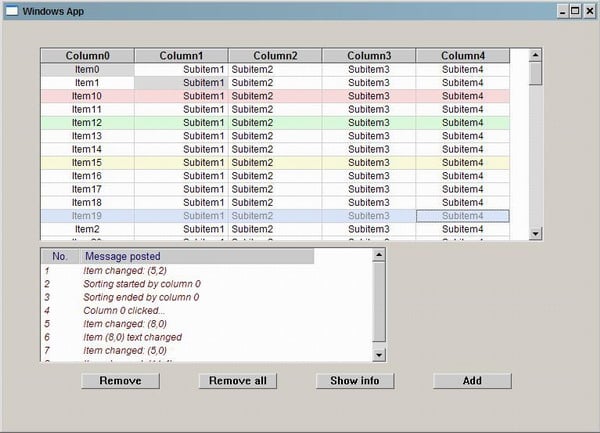
This article is about a CDataGrid control programmed using Windows SDK. It is designed to be easy to use. The current version is not totally bug free, so it would be nice if you would report all detected bugs to have an update available soon.
The grid control is very similar to a MFC CListView control when it is in the “REPORT” view state. It supports a similar item, adding and removing and with custom item sorting with an application-defined comparison function.
The Code
How to use the CDataGrid control is explained here in detail. First of all, the header file "DataGrid.h" must be included in the project. Next, a variable of type CDataGrid must be declared.
#include "DataGrid.h"
CDataGrid dataGrid;
Next, call the Create method to create and show a DataGrid window, passing as parameters handle to parent window, window rectangle, and a number of columns DataGrid will have. Then, use the InsertItem method to add items to DataGrid, passing item text and alignment. A method SetItemInfo in two versions can be used to set subitem text, alignment, selection, read-only attribute, or to change background color. In the first version, the index of the item and subitem are passed, along with subitem text, alignment, or read-only attribute directly.
dataGrid.Create( wndRect, hParentWnd, 5 );
dataGrid.InsertItem( "Item1", DGTA_LEFT );
dataGrid.InsertItem( "Item2", DGTA_CENTER );
dataGrid.InsertItem( "Item3", DGTA_RIGHT );
dataGrid.SetItemInfo( 0, 1, "Subitem1", DGTA_CENTER, false );
DG_ITEMINFO dgii;
dgii.dgMask     = DG_TEXTRONLY;
dgii.dgItem     = 1;
dgii.dgSubitem  = 0;
dgii.dgReadOnly = true;
dataGrid.SetItemInfo(&dgii);
dataGrid.Update();
To remove a single item, use RemoveItem, passing as the argument the index of the row that will be deleted.
dataGrid.RemoveItem(2);
dataGrid.Update();
Note: All indexing is zero-numbered. Also, calling the Update method is necessary after adding or removing items.
To remove all items, use RemoveAllItems, which has no agruments.
dataGrid.RemoveAllItems();
CDataGrid control has numerous features, as explained below.
Features
These are the current features of DataGrid:
- Automatic resizing with the parent window
- Enabled when the Resize method is called each time the DataGrid parent window changes its size.
- Enable/Disable sorting
- Uses the EnableSort method.
- Enable/Disable item text editing
- Uses the EnableEdit method.
- Enable/Disable column resizing
- Uses the EnableResize method.
- Enable/Disable grid
- Uses the EnableGrid method.
- Automatic scrolling to specified item
- Uses the EnsureVisible method.
- Automatic selection of specified item
- Uses the SelectItem method.
- Item sorting using custom application-defined comparison function
- Uses the SetCompareFunction method.
- Get/Set column text color
- Uses the GetColumnTextColor and SetColumnTextColor methods.
- Get/Set column font
- Uses the GetColumnFont and SetColumnFont methods.
- Get/Set row text color
- Uses the GetRowTextColor and SetRowTextColor methods.
- Get/Set row font
- Uses the GetRowFont and SetRowFont methods.
I hope to extend this list of features as soon as possible.
Notifications
CDataGridcontrol sends the following notification massages to its parent window via a WM_COMMAND message:
- DGM_ITEMCHANGED
- When focus is changed from one item to another.
- DGM_ITEMTEXTCHANGED
- When item/subitem text is changed.
- DGM_ITEMADDED
- When item is added.
- DGM_ITEMREMOVED
- When item is removed.
- DGM_COLUMNRESIZED
- When column is resized.
- DGM_COLUMNCLICKED
- When column is clicked.
- DGM_STARTSORTING
- When sorting is started.
- DGM_ENDSORTING
- When sorting is ended.
Also, this list of notifications will be extended.
Conclusion
The user can obtain all mentioned information and some more from the well-commented header file "DataGrid.h".