


Introduction
CImage is a class shared by MFC and ATL. It provides support for easy manipulation of bitmaps and different graphic file formats (BMP, JPEG, GIF, and PNG).
This article presents an extension class having methods for screen images capture.
CScreenImage class
CScreenImage is derived from CImage, uses shared MFC/ATL classes and plain Windows API, so can be inserted in any MFC or ATL-based application.
class CScreenImage : public CImage
{
public:
    BOOL CaptureRect(const CRect& rect) throw();
    BOOL CaptureScreen() throw();
    BOOL CaptureWindow(HWND hWnd) throw();
};
- CScreenImage::CaptureRect – captures an image from a given screen area;
- CScreenImage::CaptureScreen – captures the entire screen image of the first monitor;
- CScreenImage::CaptureWindow – captures the image of a given window.
CScreenImage::CaptureRect function implementation is shown below.
It uses the classic way of bit-blitting from the screen device context to a compatible memory device context.
Finally it attaches the bitmap handle to this object.
To be noticed the CAPTUREBLT flag used in BitBlt function call. This allows dealing with layered windows images.
/********************************************************************
 Function:   CScreenImage::CaptureRect
 Purpose:    captures a screen rectangle
 Parameters: rect: screen rectangle to be captured
 Return:     non-zero value if successful
*********************************************************************/
BOOL CScreenImage::CaptureRect(const CRect& rect)
{
   // detach and destroy the old bitmap if any attached
   CImage::Destroy();

   // create a screen and a memory device context
   HDC hDCScreen = ::CreateDC(_T("DISPLAY"), NULL, NULL, NULL);
   HDC hDCMem = ::CreateCompatibleDC(hDCScreen);
   // create a compatible bitmap and select it in the memory DC
   HBITMAP hBitmap =
      ::CreateCompatibleBitmap(hDCScreen, rect.Width(), rect.Height());
   HBITMAP hBmpOld = (HBITMAP)::SelectObject(hDCMem, hBitmap);

   // bit-blit from screen to memory device context
   // note: CAPTUREBLT flag is required to capture layered windows
   DWORD dwRop = SRCCOPY | CAPTUREBLT;
   BOOL bRet = ::BitBlt(hDCMem, 0, 0, rect.Width(), rect.Height(),
                        hDCScreen, rect.left, rect.top, dwRop);
   // attach bitmap handle to this object
   Attach(hBitmap);

   // restore the memory DC and perform cleanup
   ::SelectObject(hDCMem, hBmpOld);
   ::DeleteDC(hDCMem);
   ::DeleteDC(hDCScreen);

   return bRet;
}
The other methods implementation can be found in attached source code and demo application.
Demo application
The demo application is a simple SDI application which uses CScreenImage class to capture images from the screen and display them in a view.
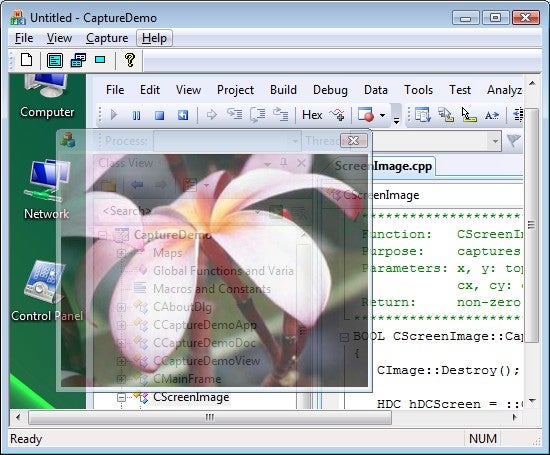
From the Capture menu you can choose the following items:
- Screen, to capture the entire screen image of the first monitor;
- Foreground window, to capture the image of the window with which the user is currently working;
- Rectangle, to capture the image of a selected screen area, using the mouse.
It can further be improved by adding other features like capturing any other top-level or child window, capturing client areas, saving image in a file and so on.