


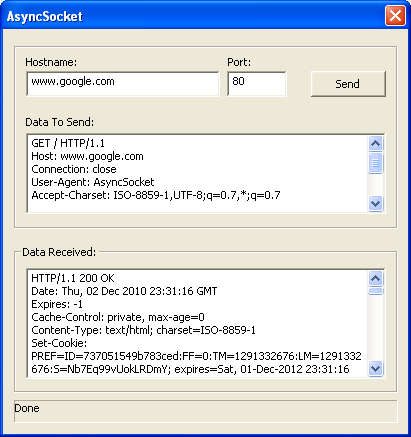
Introduction
I created this class while trying to avoid having recv hang/block indefinitely in a simple client application I was working on, without using MFC.
recv can hang for a variety of reasons most common is untimely calling of recv or calling it when the remote server didn’t send data it was supposed to send, e.g.: because of a malformed request.
Using the code
    #include "XSocket.h"


    ....

	CXSocket mySock;

	if (!mySock.Init()) //initalize winsocks
	    return false;

	//////////////////////////////////////////////////////////////////////////

	if (!mySock.Connect(pHostName, nPort))
	{
	    int nError = mySock.GetLastError();
	    return false;
	}

	/////////////////////////////////////////////////////////////////////////

	// Send a buffer, 5 seconds timeout
	// further error checking omitted for previty

	int nLen = 0;
	if (mySock.Send(szBuff, strlen(szBuff), nLen, 5000) != E_XSOCKET_SUCCESS)
	    return false;


	/////////////////////////////////////////////////////////////////////////

	// Receive server's response, 5 seconds time out
	// last argument is optional, if not used Rec will return immediately

	do
	{
	    if (mySock.Recv(szBuff, sizeof(szBuff) - 1, nLen, 5000)
			!= E_XSOCKET_SUCCESS)
	    {
		break;
	    }
	}
        while (nLen == sizeof(szBuff));


    //////////////////////////////////////////////////////////////////////////

    // Optional: explicitly close the socket, if not called socket will be closed
    // auto on destruction

    mySock.Close();
Canceling a request, regardless of timeout:
mySock.Abort();
Checking if there is data available for reading, this can be called at any time after a successful Connect:
long lLen = mySocket.GetLenDataAvail();
Points of Interest
We turn on nonblocking mode for the socket and at the same time attach an event object to it by calling:
WSAEventSelect(hSocket, hEvent, FD_READ | FD_WRITE | FD_CLOSE)
This will attach hEvent to hSocket so that when there is a new read, write and close event
hEvent will be signaled. Also WSAEventSelect automatically sets hSocket to nonblocking mode.
Sending Data
Data sending code looks like this:
int CXSocket::Send(const char* pBuff, int nLen, int& nLenSent, DWORD dwTimeOut)
{

_BEGIN:

	int nRet = 0;
	m_nLastError = 0;

	if ((nRet = send(m_hSocket, pBuff, nLen, 0)) > 0 || (m_nLastError = WSAGetLastError()) != WSAEWOULDBLOCK)
		return E_XSOCKET_SUCCESS;


	///////////////////////////////////////////////////////////////////////////////////

	HANDLE arrHandles[2];

	arrHandles[0] = m_eventNet.GetEvent();
	arrHandles[1] = m_eventStop.GetEvent();

	DWORD dwWaitRes = WaitForMultipleObjects(2, arrHandles, FALSE, dwTimeOut);

	if (dwWaitRes == WAIT_OBJECT_0 + 1)
		return E_XSOCKET_ABORTED;
	else if (dwWaitRes != WAIT_OBJECT_0)
		return E_XSOCKET_TIMEDOUT;


	//////////////////////////////////////////////////////////////////////////////////

	WSANETWORKEVENTS myNetEvents;

	if (WSAEnumNetworkEvents(m_hSocket, m_eventNet.GetEvent(), &myNetEvents) != 0)
	{
		m_nLastError = WSAGetLastError();
		return E_XSOCKET_SOCKERR;
	}

	if ((myNetEvents.lNetworkEvents & FD_WRITE) != FD_WRITE)
	{
		goto _BEGIN;
	}

	if (myNetEvents.iErrorCode[FD_WRITE_BIT] != 0)
		return E_XSOCKET_SOCKERR;


	/////////////////////////////////////////////////////////////////////////////////////

	nLenSent = send(m_hSocket, pBuff, nLen, 0);


	return E_XSOCKET_SUCCESS;
}
What we do here is first issue a Send request, if our request can be fulfilled data will be sent immediately and return value of Send will be the length of data actually sent. Otherwise
our request will be queued and Send will return WSAEWOULDBLOCK. The Winsock subsystem will then notify us when it is possible to send our data through signaling the event we attached to
the socket earlier. At that point we call WSAEnumNetworkEvents to make sure the event is an FD_WRITE if it is not we continue waiting for FD_WRITE (if dwTimeOut is greater than zero).
Receiving Data
Data receiving code looks like this:
int CXSocket::Recv(char* pBuff, int nLen, int& nLenReceived, DWORD dwTimeOut)
{

_BEGIN:

	///////////////////////////////////////////////////////////////////////////////////

	HANDLE arrHandles[2];

	arrHandles[0] = m_eventNet.GetEvent();
	arrHandles[1] = m_eventStop.GetEvent();

	DWORD dwWaitRes = WaitForMultipleObjects(2, arrHandles, FALSE, dwTimeOut);

	if (dwWaitRes == WAIT_OBJECT_0 + 1)
		return E_XSOCKET_ABORTED;
	else if (dwWaitRes != WAIT_OBJECT_0)
		return E_XSOCKET_TIMEDOUT;


	////////////////////////////////////////////////////////////////////////////////////

	WSANETWORKEVENTS myNetEvents;

	if (WSAEnumNetworkEvents(m_hSocket, m_eventNet.GetEvent(), &myNetEvents) != 0)
	{
		m_nLastError = WSAGetLastError();
		return E_XSOCKET_SOCKERR;
	}

	if ((myNetEvents.lNetworkEvents & FD_READ) != FD_READ)
		goto _BEGIN;

	if (myNetEvents.iErrorCode[FD_READ_BIT] != 0)
		return E_XSOCKET_SOCKERR;


	/////////////////////////////////////////////////////////////////////////////////////

	if ((nLenReceived = recv(m_hSocket, pBuff, nLen, 0)) == WSAEWOULDBLOCK)
	{
		nLenReceived = 0;
		return E_XSOCKET_NOMOREDATA;
	}


	return E_XSOCKET_SUCCESS;
}
What we do is wait for an FD_READ event. If we get it we call recv to read the data available.
History
03 DEC 11 first release.
Latest Version
Latest version available here