


Introduction
With the general availability of Windows
Phone “Mango”, Windows Phone consumers around the world might have one
of two Windows Phone OS on their phones – the original Windows Phone 7.0 or the
recently announced Windows Phone 7.1 (code-named “Mango”).
Smart developers would like to make sure that their Windows
Phone application can target the older version of Windows Phone (7.0) even
though they may be using the latest version of Windows Phone
development tools (7.1)
Why Multi-targeting
Developers usually release fixes for their applications.
However each update of their application is tied to the target version of the
Windows Phone operating system. Say, you have a YouTube application created for
the original WP 7.0 OS. Say, a new version of this application is available, which
fixes a lot of bugs that existed in the original application. If this updated
application is targeted for Windows Phone 7.1, then users that still have WP
7.0 will not see this update. Hence, developers will need to release two versions
of the application – one targeted for WP 7.0 and another targeted for WP 7.1
“Mango”.
How to Specify Multi-targeting in Your Visual Studio Project
Fortunately for Windows Phone developers, the SDK tools for
Windows Phone 7.1 bring multi-targeting support to Visual Studio.
Whenever a developer creates a Windows Phone
application/library using Windows Phone “Mango” SDK tools, they have an option
to choose the Windows Phone version they want to target.
For example, let us create a Windows Phone application using
WP 7.1 SDK tools.
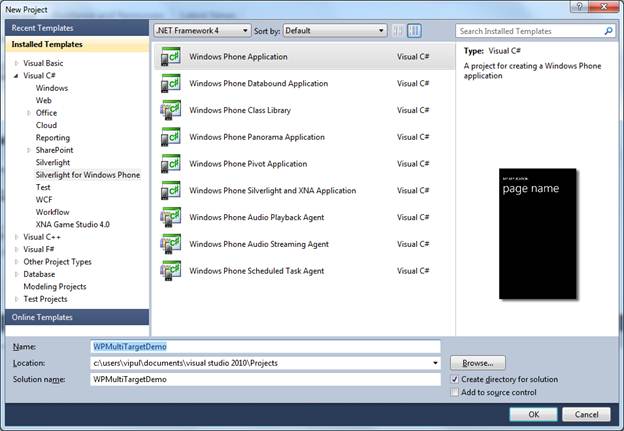
Figure 1: Create a Windows Phone application using WP 7.1 SDK tools
When we click OK, Visual Studio prompts us to choose the
Windows Phone OS version we want to target.
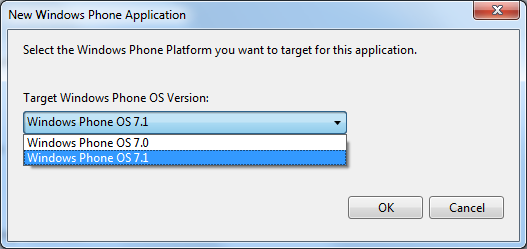
Figure 2: Target Windows Phone OS Version
If we choose 7.0 as the target version, and you open up the
WMAppManifest.xml file, you will notice the following line.
<Deployment xmlns="http://schemas.microsoft.com/windowsphone/2009/deployment" AppPlatformVersion="7.0">
If we choose 7.1 as the target version, the
WMAppManifest.xml file will contain the following.
<Deployment xmlns="http://schemas.microsoft.com/windowsphone/2009/deployment" AppPlatformVersion="7.1">
We see that WP 7.0 and WP7.1 applications basically differ
in the AppPlatformVersion property in its application manifest file.
Summary
In this article, we learned how to multi-target a Windows
Phone application. I hope you have found this information useful. You can check
out the different values of AppPlaformVersion property by creating your own
projects or downloading the sample project from here.