


Introduction
One of the most fun things to do in my life is to play cards with my wife. We invented our own game and play just for fun mostly. If there were bets involved, I always end up losing. We do like ordinary card games as well: I love Blackjack and Poker. Because I have already made a small app demonstrating how Blackjack works, “Creating a Blackjack Game in Visual Basic,” I thought it apt to demonstrate just how difficult Poker can be.
With this article, I will demonstrate how to calculate each winning hand in Poker. Let’s get started.
Practical
Create a new Visual Basic Console application. You may give it any name you desire. This application’s purpose is to calculate each winning hand and show how you the percentage of the occurrence of each hand.
Add The Card class:
Enum Suit

   None
   Diamonds
   Hearts
   Clubs
   Spades

End Enum

Enum Rank

   None
   Ace
   Two
   Three
   Four
   Five
   Six
   Seven
   Eight
   Nine
   Ten
   Jack
   Queen
   King

End Enum

Enum Score

   None
   JacksOrBetter
   TwoPair
   ThreeOfAKind
   Straight
   Flush
   FullHouse
   FourOfAKind
   StraightFlush
   RoyalFlush

End Enum

Class Card

   Private rRank As Rank

   Private sSuit As Suit

   Public ReadOnly Property rank As Rank

      Get

         Return rRank

      End Get

   End Property

   Public ReadOnly Property suit As Suit

      Get

         Return sSuit

      End Get

   End Property

   Public Sub New(ByVal rank As Rank, ByVal suit As Suit)

      Me.rRank = rank
      Me.sSuit = suit

   End Sub

   Public Overrides Function ToString() As String

      Return rRank & " " + sSuit

   End Function

   Public Function JackorHigher() As Boolean

      If rRank = Rank.Ace Then Return True
      If rRank >= Rank.Jack Then Return True

      Return False

   End Function

End Class
This class is quite straightforward. It creates the Card Suits, The Card Ranks, as well as the score. Add the Deck class next:
Class Deck

   Private cCard As Card()

   Private intTemp As Integer = 0

   Private rRand As Random = New Random()

   Public Sub New()

      Initialize()

   End Sub

   Private Sub Initialize()

      intTemp = 0

      cCard = New Card(51) {}

      Dim intCount As Integer = 0

      For Each s As Suit In [Enum].GetValues(GetType(Suit))
         For Each r As Rank In [Enum].GetValues(GetType(Rank))
            If r <> Rank.None AndAlso s <> Suit.None _
               Then cCard(Math.Min(System.Threading.Interlocked _
               .Increment(intCount), intCount - 1)) = _
               New Card(r, s)

         Next

      Next

   End Sub

   Public Function DrawCard() As Card

      Return cCard(Math.Min(System.Threading.Interlocked _
         .Increment(intTemp), intTemp - 1))

   End Function

   Private Sub SwapCards(ByVal i As Integer, ByVal j As Integer)

      Dim tmpcard As Card = cCard(i)

      cCard(i) = cCard(j)
      cCard(j) = tmpcard

   End Sub

   Public Sub Randomize(ByVal iCount As Integer)

      intTemp = 0

      Dim i As Integer
      Dim j As Integer

      While i < iCount

         While j < 52

            Dim index As Integer = rRand.[Next](52)

            SwapCards(j, index)

            System.Threading.Interlocked.Increment(j)

         End While

         System.Threading.Interlocked.Increment(i)

      End While

   End Sub

   Public Sub Shuffle()

      Randomize(10)

   End Sub

End Class
The Deck class is simply responsible for rearranging all 52 cards as well as exposing the Shuffling methods. Add the Hand class next:
Imports System.Text

Class Hand

   Private dDeck As Deck

   Private cCard As Card()

   Public Sub New(ByVal deck As Deck)

      dDeck = deck
      cCard = New Card(4) {}

   End Sub

   Public Sub DrawCards()

      Dim i As Integer

      While i < 5

         cCard(i) = dDeck.DrawCard()

         System.Threading.Interlocked.Increment(i)

      End While

   End Sub

   Public Overrides Function ToString() As String

      Dim sbMessage As StringBuilder = New StringBuilder()

      For Each c As Card In cCard

         sbMessage.Append(c)
         sbMessage.Append(", ")

      Next

      Return sbMessage.ToString()

   End Function

   Default Public ReadOnly Property Item(ByVal index As Integer) _
         As Card

      Get

         Return cCard(index)

      End Get

   End Property

End Class
The Hand class represents the dealt hand with the drawn cards. Add the physical Game scoring class that will identify how to score drawn cards.
Class Game

   Private Shared Function Flush(ByVal h As Hand) As Boolean

      If h(0).suit = h(1).suit AndAlso
         h(1).suit = h(2).suit AndAlso h(2).suit = h(3).suit _
            AndAlso
         h(3).suit = h(4).suit Then Return True

      Return False

   End Function

   Private Shared Function Straight(ByVal h As Hand) As Boolean

      If h(0).rank = h(1).rank - 1 AndAlso
         h(1).rank = h(2).rank - 1 AndAlso h(2).rank = h(3).rank _
            - 1 AndAlso
         h(3).rank = h(4).rank - 1 Then Return True

      If h(1).rank = Rank.Ten AndAlso h(2).rank = Rank.Jack _
            AndAlso
         h(3).rank = Rank.Queen AndAlso h(4).rank = Rank.King _
            AndAlso
         h(0).rank = Rank.Ace Then Return True

      Return False

   End Function

   Private Shared Function RoyalFlush(ByVal h As Hand) As Boolean

      If Straight(h) AndAlso Flush(h) AndAlso h(0).rank = _
            Rank.Ace AndAlso
         h(1).rank = Rank.Ten AndAlso h(2).rank = Rank.Jack _
            AndAlso h(3).rank = Rank.Queen AndAlso
         h(4).rank = Rank.King Then Return True

      Return False

   End Function

   Private Shared Function StraightFlush(ByVal h As Hand) _
         As Boolean

      If Straight(h) AndAlso Flush(h) Then Return True

      Return False

   End Function

   Private Shared Function FourOfAKind(ByVal h As Hand) As Boolean

      If h(0).rank = h(1).rank AndAlso h(1).rank = h(2).rank _
         AndAlso h(2).rank = h(3).rank Then Return True

      If h(1).rank = h(2).rank AndAlso h(2).rank = h(3).rank _
         AndAlso h(3).rank = h(4).rank Then Return True

      Return False

   End Function

   Private Shared Function FullHouse(ByVal h As Hand) As Boolean

      If h(0).rank = h(1).rank AndAlso h(2).rank = h(3).rank _
         AndAlso h(3).rank = h(4).rank Then Return True

      If h(0).rank = h(1).rank AndAlso h(1).rank = h(2).rank _
         AndAlso h(3).rank = h(4).rank Then Return True

      Return False

   End Function

   Private Shared Function ThreeOfAKind(ByVal h As Hand) As Boolean

      If h(0).rank = h(1).rank AndAlso h(1).rank = h(2).rank Then _
         Return True

      If h(1).rank = h(2).rank AndAlso h(2).rank = h(3).rank Then _
         Return True

      If h(2).rank = h(3).rank AndAlso h(3).rank = h(4).rank Then _
         Return True

      Return False

   End Function

   Private Shared Function TwoPair(ByVal h As Hand) As Boolean

      If h(0).rank = h(1).rank AndAlso h(2).rank = h(3).rank Then _
         Return True

      If h(0).rank = h(1).rank AndAlso h(3).rank = h(4).rank Then _
         Return True

      If h(1).rank = h(2).rank AndAlso h(3).rank = h(4).rank Then _
         Return True

      Return False

   End Function

   Private Shared Function JacksOrBetter(ByVal h As Hand) _
         As Boolean

      If h(0).rank = h(1).rank AndAlso h(0).JackorHigher() Then _
         Return True

      If h(1).rank = h(2).rank AndAlso h(1).JackorHigher() Then _
         Return True

      If h(2).rank = h(3).rank AndAlso h(2).JackorHigher() Then _
         Return True

      If h(3).rank = h(4).rank AndAlso h(3).JackorHigher() Then _
         Return True

      Return False
   End Function

   Public Shared Function score(ByVal h As Hand) As Score

      If RoyalFlush(h) Then

         Return Score.RoyalFlush

      ElseIf StraightFlush(h) Then

         Return Score.StraightFlush

      ElseIf FourOfAKind(h) Then

         Return Score.FourOfAKind

      ElseIf FullHouse(h) Then

         Return Score.FullHouse

      ElseIf Flush(h) Then

         Return Score.Flush

      ElseIf Straight(h) Then

         Return Score.Straight

      ElseIf ThreeOfAKind(h) Then

         Return Score.ThreeOfAKind

      ElseIf TwoPair(h) Then

         Return Score.TwoPair

      ElseIf JacksOrBetter(h) Then

         Return Score.JacksOrBetter

      Else

         Return Score.None

      End If

   End Function

End Class
Add the Results screen class:
Class Stats

   Private intCount As Integer

   Private Rounds As Integer() = New Integer([Enum].GetValues _
      (GetType(Score)).Length - 1) {}

   Public Sub Results()

      Console.WriteLine("{0,10}" & vbTab & "{1,10}" & _
         vbTab & "{2,10}", "Hand", "Count", "Percent")

      Dim i As Integer

      While i < Rounds.Length

         Console.WriteLine("{0,-10}" & vbTab & "{1,10}" & _
            vbTab & "{2,10:p4}", [Enum].GetName(GetType _
            (Score), i), Rounds(i), Rounds(i) / CDbl(intCount))

         System.Threading.Interlocked.Increment(i)

      End While

      Console.WriteLine("{0,10}" & vbTab & "{1,10}", _
         "Total Hands", intCount)

   End Sub

   Public Sub Append(ByVal sScore As Score)

      Rounds(CInt(sScore)) += 1

   End Sub

   Public Sub Clear()

      Dim i As Integer

      While i < Rounds.Length

         Rounds(i) = 0

         System.Threading.Interlocked.Increment(i)

      End While

   End Sub

   Public Sub New()

      Clear()

   End Sub

   Public Property Count As Integer

      Set(ByVal value As Integer)

         intCount = value

      End Set

      Get

         Return intCount

      End Get

   End Property

End Class
The Stats class outputs the results, as you will see in Figure 1.
Lastly, add the code for the Module:
Module Module1

   Public Sub Main(ByVal args As String())

      Dim intCount As Integer = 2500

      If args.Length = 1 Then intCount = Integer.Parse(args(0))

      Dim dDeck As Deck = New Deck()

      Dim hHand As Hand = New Hand(dDeck)

      Dim sStats As Stats = New Stats()

      sStats.Count = intCount

      For i As Integer = 0 To intCount - 1

         dDeck.Shuffle()
         hHand.DrawCards()

         Dim Score As Score = Game.score(hHand)

         sStats.Append(Score)

      Next

      Console.WriteLine()

      sStats.Results()

      Console.ReadLine()

   End Sub

End Module
When you run your application now, a summary output similar to Figure 1 will be displayed.
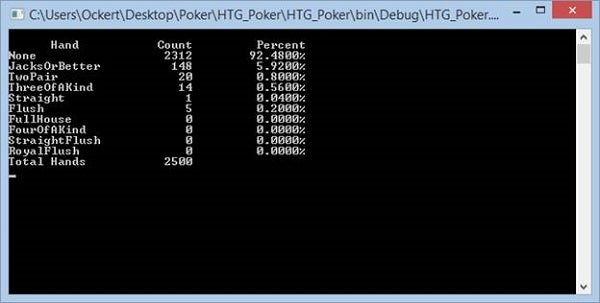
Figure 1: Summary
The source code for this article can be found on GitHub.
Conclusion
Scoring a Poker game is not too difficult. By knowing how the scores are computed, you are more than halfway in creating your game engine. Hopefully, I can post an updated version soon. Until then, cheers!