


The .NET Framework provides numerous ways to obtain system information. Visual Basic.NET makes it even easier, but the ultimate power still lies within Windows itself, as you will soon see. Today, you will learn several ways to obtain information about your computer during runtime.
The ComputerInfo Class
The ComputerInfo class provides various properties for getting information about the computer’s Operating System, memory, name, and loaded assemblies. The ComputerInfo class has the following Properties:
- AvailablePhysicalMemory: Gets the amount of free physical memory.
- AvailableVirtualMemory: Gets the amount of free virtual memory.
- InstalledUICulture: Gets the current UI culture installed.
- OSFullName: Gets the full Operating System name.
- OSPlatform: Gets the platform of the Operating System.
- OSVersion: Gets the Operating System version.
- TotalPhysicalMemory: Gets the total physical memory for the computer.
- TotalVirtualMemory: Gets the total virtual memory available for the computer.
- System.Management Namespace: Provides access management information and events about the system, devices, and all applications instrumented to the WMI (Windows Management Instrumentation) infrastructure.
Practical
Your practical example today will make use of the ComputerInfo class to get some of the system information. Later, you will make use of the System.Management namespace to get more advanced system information.
Start Visual Studio and create a new Visual Basic Windows Forms application. You may name your project anything you desire, but, as always, keep in mind that my objects might be named differently. Your project will consist of for forms, with the first form having the most interaction. So, let’s design the forms one by one as shown next.
Form 1
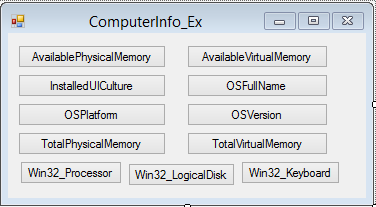
Figure 1: Design of Form 1
Design your other three forms to look similar to Figure 2, of Form 2. It simply contains one Multi-line textbox.
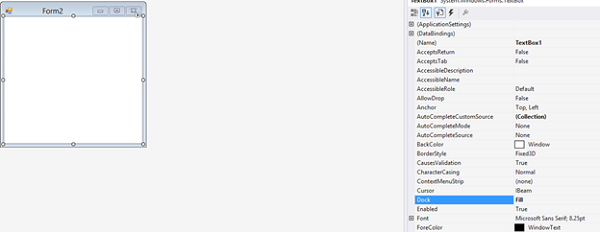
Figure 2: The design of Forms 2-4
Add the following code for the button labeled ‘Available Physical Memory‘:
   Private Sub btnAvailablePhysicalMemory_Click(sender As Object, _
         e As EventArgs) Handles btnAvailablePhysicalMemory.Click

      MessageBox.Show("Available Physical Memory: " & _
         My.Computer.Info.AvailablePhysicalMemory)

   End Sub
This code simply displays the amount of physical memory on your computer. Add the following code:
   Private Sub btnAvailableVirtualMemory_Click(sender As Object, _
         e As EventArgs) Handles btnAvailableVirtualMemory.Click

      MessageBox.Show("Available Virtual Memory: " & _
         My.Computer.Info.AvailableVirtualMemory)

   End Sub

   Private Sub btnInstalledUICulture_Click(sender As Object, _
         e As EventArgs) Handles btnInstalledUICulture.Click

      MessageBox.Show("UI Culture Name: " & _
         My.Computer.Info.InstalledUICulture.DisplayName)

   End Sub

   Private Sub btnOSFullName_Click(sender As Object, _
         e As EventArgs) Handles btnOSFullName.Click

      MessageBox.Show("Operating System Name: " & _
         My.Computer.Info.OSFullName)

   End Sub

   Private Sub btnOSPlatform_Click(sender As Object, _
         e As EventArgs) Handles btnOSPlatform.Click

      MessageBox.Show("Operating System Platform: " & _
         My.Computer.Info.OSPlatform)

   End Sub

   Private Sub btnOSVersion_Click(sender As Object, _
         e As EventArgs) Handles btnOSVersion.Click

      MessageBox.Show("Operating System Version: " & _
         My.Computer.Info.OSVersion)

   End Sub

   Private Sub btnTotalPhysicalMemory_Click(sender As Object, _
         e As EventArgs) Handles btnTotalPhysicalMemory.Click

      MessageBox.Show("Available Physical Memory: " & _
         My.Computer.Info.TotalPhysicalMemory)

   End Sub

   Private Sub btnTotalVirtualMemory_Click(sender As Object, _
         e As EventArgs) Handles btnTotalVirtualMemory.Click

      MessageBox.Show("Available Virtual Memory: " & _
         My.Computer.Info.TotalVirtualMemory)

   End Sub
By making use of the ComputerInfo class, you now are able to detect the physical memory, virtual memory, and get basic Operating System details.
The remaining three buttons simply need to load the appropriate form, so let’s put those in now:
   Private Sub Button1_Click(sender As Object, e As EventArgs) _
         Handles Button1.Click

      Dim f2 As New Form2

      f2.Show()

   End Sub

   Private Sub Button2_Click(sender As Object, e As EventArgs) _
         Handles Button2.Click

      Dim f3 As New Form3

      f3.Show()

   End Sub

   Private Sub Button3_Click(sender As Object, e As EventArgs) _
         Handles Button3.Click

      Dim f4 As New Form4

      f4.Show()

   End Sub
Each form must show different properties for different aspects of the Operating System. For example: Form 2 should show details that pertain to the Processor, Form 3 has to show information on the Logical Disks, and Form 4 has to show properties and details of the keyboard. All of this is possible through the management namespace and WMI Service Management.
What follows is an alphabetical list of Win32 classes we can tap into:
- Win32_1394Controller
- Win32_1394ControllerDevice
- Win32_AccountSID
- Win32_ActionCheck
- Win32_ActiveRoute
- Win32_AllocatedResource
- Win32_ApplicationCommandLine
- Win32_ApplicationService
- Win32_AssociatedProcessorMemory
- Win32_AutochkSetting
- Win32_BaseBoard
- Win32_Battery
- Win32_Binary
- Win32_BindImageAction
- Win32_BootConfiguration
- Win32_Bus Win32_CacheMemory
- Win32_CDROMDrive
- Win32_CheckCheck
- Win32_CIMLogicalDeviceCIMDataFile
- Win32_ClassicCOMApplicationClasses
- Win32_ClassicCOMClass
- Win32_ClassicCOMClassSetting
- Win32_ClassicCOMClassSettings
- Win32_ClassInforAction
- Win32_ClientApplicationSetting
- Win32_CodecFile
- Win32_COMApplicationSettings
- Win32_COMClassAutoEmulator
- Win32_ComClassEmulator
- Win32_ComponentCategory
- Win32_ComputerSystem
- Win32_ComputerSystemProcessor
- Win32_ComputerSystemProduct
- Win32_ComputerSystemWindowsProductActivationSetting
- Win32_Condition
- Win32_ConnectionShare
- Win32_ControllerHastHub
- Win32_CreateFolderAction
- Win32_CurrentProbe
- Win32_DCOMApplication
- Win32_DCOMApplicationAccessAllowedSetting
- Win32_DCOMApplicationLaunchAllowedSetting
- Win32_DCOMApplicationSetting
- Win32_DependentService
- Win32_Desktop
- Win32_DeviceBus
- Win32_DeviceMemoryAddress
- Win32_Directory
- Win32_DirectorySpecification
- Win32_DiskDrive
- Win32_DiskDrivePhysicalMedia
- Win32_DiskDriveToDiskPartition
- Win32_DiskPartition
- Win32_DiskQuota
- Win32_DisplayConfiguration
- Win32_DisplayControllerConfiguration
- Win32_DMAChanner
- Win32_DriverForDevice
- Win32_DuplicateFileAction
- Win32_Environment
- Win32_EnvironmentSpecification
- Win32_ExtensionInfoAction
- Win32_Fan
- Win32_FileSpecification
- Win32_FloppyDrive
- Win32_FontInfoAction
- Win32_Group
- Win32_GroupDomain
- Win32_GroupUser
- Win32_HeatPipe
- Win32_IDEControllerDevice
- Win32_ImplementedCategory
- Win32_InfraredDevice
- Win32_IniFileSpecification
- Win32_InstalledSoftwareElement
- Win32_IP4PersistedRouteTable
- Win32_IP4RouteTable
- Win32_IRQResource
- Win32_Keyboard
- Win32_LaunchCondition
- Win32_LoadOrderGroupServiceDependencies
- Win32_LoadOrderGroupServiceMembers
- Win32_LocalTime
- Win32_LoggedOnUser
- Win32_LogicalDisk
- Win32_LogicalDiskRootDirectory
- Win32_LogicalDiskToPartition
- Win32_LogicalFileAuditing
- Win32_LogicalFileGroup
- Win32_LogicalFileOwner
- Win32_LogicalFileSecuritySetting
- Win32_LogicalProgramGroup
- Win32_LogicalProgramGroupDirectory
- Win32_LogicalProgramGroupItem
- Win32_LogicalProgramGroupItemDataFile
- Win32_LogicalShareAccess
- Win32_LogicalShareAuditing
- Win32_LogicalShareSecuritySetting
- Win32_LogonSession
- Win32_MappedLogicalDisk
- Win32_MemoryArray
- Win32_MemoryArrayLocation
- Win32_MemoryDevice
- Win32_MemoryDeviceArray
- Win32_MemoryDeviceLocation
- Win32_MIMEInfoAction
- Win32_MotherboardDevice
- Win32_MoveFileAction
- Win32_NamedJobObjectActgInfo
- Win32_NamedJobObjectLimit
- Win32_NamedJobObjectLimitSetting
- Win32_NamedJobObjectProcess
- Win32_NamedJobObjectSecLimit
- Win32_NamedJobObjectSecLimitSetting
- Win32_NetworkAdapter
- Win32_NetworkAdapterConfiguration
- Win32_NetworkAdapterSetting
- Win32_NetworkClient
- Win32_NetworkConnection
- Win32_NetworkLoginProfile
- Win32_NetworkProtocol
- Win32_NTDomain
- Win32_NTLogEvnetLog
- Win32_NTLogEventUser
- Win32_ODBCAttribute
- Win32_ODBCDataSourceAttribute
- Win32_ODBCDataSourceSpecification
- Win32_ODBCDriverAttribute
- Win32_ODBCDriverSoftwareElement
- Win32_ODBCDriverSpecification
- Win32_ODBCTranslatorSpecification
- Win32_OnBoardDevice
- Win32_OperatingSystem
- Win32_OperatingSystemAutochkSetting
- Win32_OperatingSystemQFE
- Win32_OSRecoveryConfiguración
- Win32_PageFileElementSetting
- Win32_PageFileSetting
- Win32_PageFileUsage
- Win32_ParallelPort
- Win32_PatchFile
- Win32_PatchPackage
- Win32_PCMCIAControler
- Win32_PerfFormattedData_ASP_ActiveServerPages
- Win32_PerfFormattedData_ASPNET_ASPNET
- Win32_PerfFormattedData_ASPNET_ASPNETApplications
- Win32_PerfFormattedData_aspnet_state_ASPNETStateService
- Win32_PerfFormattedData_ContentIndex_IndexingService
- Win32_PerfFormattedData_DTSPipeline_SQLServerDTSPipeline
- Win32_PerfFormattedData_Fax_FaxServices
- Win32_PerfFormattedData_InetInfo_InternetInformationServicesGlobal
- Win32_PerfFormattedData_ISAPISearch_HttpIndexingService
- Win32_PerfFormattedData_MSDTC_DistributedTransactionCoordinator
- Win32_PerfFormattedData_NETCLRData_NETCLRData
- Win32_PerfFormattedData_NETCLRNetworking_NETCLRNetworking
- Win32_PerfFormattedData_NETDataProviderforOracle_NETCLRData
- Win32_PerfFormattedData_NETDataProviderforSqlServer_NETDataProviderforSqlServer
- Win32_PerfFormattedData_NETFramework_NETCLRExceptions
- Win32_PerfFormattedData_NETFramework_NETCLRInterop
- Win32_PerfFormattedData_NETFramework_NETCLRJit
- Win32_PerfFormattedData_NETFramework_NETCLRRemoting
- Win32_PerfFormattedData_NETFramework_NETCLRSecurity
- Win32_PerfFormattedData_Outlook_Outlook
- Win32_PerfFormattedData_PerfDisk_LogicalDisk
- Win32_PerfFormattedData_PerfDisk_PhysicalDisk
- Win32_PerfFormattedData_PerfNet_Browser
- Win32_PerfFormattedData_PerfNet_Redirector
- Win32_PerfFormattedData_PerfNet_Server
- Win32_PerfFormattedData_PerfNet_ServerWorkQueues
- Win32_PerfFormattedData_PerfOS_Cache
- Win32_PerfFormattedData_PerfOS_Memory
- Win32_PerfFormattedData_PerfOS_Objects
- Win32_PerfFormattedData_PerfOS_Processor
- Win32_PerfFormattedData_PerfOS_System
- Win32_PerfFormattedData_PerfProc_FullImage_Costly
- Win32_PerfFormattedData_PerfProc_Image_Costly
- Win32_PerfFormattedData_PerfProc_JobObject
- Win32_PerfFormattedData_PerfProc_JobObjectDetails
- Win32_PerfFormattedData_PerfProc_Process
- Win32_PerfFormattedData_PerfProc_ProcessAddressSpace_Costly
- Win32_PerfFormattedData_PerfProc_Thread
- Win32_PerfFormattedData_PerfProc_ThreadDetails_Costly
- Win32_PerfFormattedData_RemoteAccess_RASPort
- Win32_PerfFormattedData_RemoteAccess_RASTotal
- Win32_PerfFormattedData_RSVP_RSVPInterfaces
- Win32_PerfFormattedData_RSVP_RSVPService
- Win32_PerfFormattedData_Spooler_PrintQueue
- Win32_PerfFormattedData_TapiSrv_Telephony
- Win32_PerfFormattedData_Tcpip_ICMP
- Win32_PerfFormattedData_Tcpip_IP
- Win32_PerfFormattedData_Tcpip_NetworkInterface
- Win32_PerfFormattedData_Tcpip_TCP
- Win32_PerfFormattedData_Tcpip_UDP
- Win32_PerfFormattedData_TermService_TerminalServices
- Win32_PerfFormattedData_TermService_TerminalServicesSession
- Win32_PerfFormattedData_W3SVC_WebService
- Win32_PerfRawData_ASP_ActiveServerPages
- Win32_PerfRawData_ASPNET_114322_ASPNETAppsv114322
- Win32_PerfRawData_ASPNET_114322_ASPNETv114322
- Win32_PerfRawData_ASPNET_2040607_ASPNETAppsv2040607
- Win32_PerfRawData_ASPNET_2040607_ASPNETv2040607
- Win32_PerfRawData_ASPNET_ASPNET
- Win32_PerfRawData_ASPNET_ASPNETApplications
- Win32_PerfRawData_aspnet_state_ASPNETStateService
- Win32_PerfRawData_ContentFilter_IndexingServiceFilter
- Win32_PerfRawData_ContentIndex_IndexingService
- Win32_PerfRawData_DTSPipeline_SQLServerDTSPipeline
- Win32_PerfRawData_InetInfo_InternetInformationServicesGlobal
- Win32_PerfRawData_ISAPISearch_HttpIndexingService
- Win32_PerfRawData_MSDTC_DistributedTransactionCoordinator
- Win32_PerfRawData_NETCLRData_NETCLRData
- Win32_PerfRawData_NETCLRNetworking_NETCLRNetworking
- Win32_PerfRawData_NETDataProviderforOracle_NETCLRData
- Win32_PerfRawData_NETDataProviderforSqlServer_NETDataProviderforSqlServer
- Win32_PerfRawData_NETFramework_NETCLRExceptions
- Win32_PerfRawData_NETFramework_NETCLRInterop
- Win32_PerfRawData_NETFramework_NETCLRJit
- Win32_PerfRawData_NETFramework_NETCLRLoading
- Win32_PerfRawData_NETFramework_NETCLRLocksAndThreads
- Win32_PerfRawData_NETFramework_NETCLRRemoting
- Win32_PerfRawData_NETFramework_NETCLRSecurity
- Win32_PerfRawData_NTFSDRV_ControladordealmacenamientoNTFSdeSMTP
- Win32_PerfRawData_Outlook_Outlook
- Win32_PerfRawData_PerfDisk_LogicalDisk
- Win32_PerfRawData_PerfDisk_PhysicalDisk
- Win32_PerfRawData_PerfNet_Browser
- Win32_PerfRawData_PerfNet_Redirector
- Win32_PerfRawData_PerfNet_Server
- Win32_PerfRawData_PerfNet_ServerWorkQueues
- Win32_PerfRawData_PerfOS_Cache
- Win32_PerfRawData_PerfOS_Memory
- Win32_PerfRawData_PerfOS_Objects
- Win32_PerfRawData_PerfOS_Processor
- Win32_PerfRawData_PerfOS_System
- Win32_PerfRawData_PerfProc_FullImage_Costly
- Win32_PerfRawData_PerfProc_Image_Costly
- Win32_PerfRawData_PerfProc_JobObject
- Win32_PerfRawData_PerfProc_JobObjectDetails
- Win32_PerfRawData_PerfProc_Process
- Win32_PerfRawData_PerfProc_ProcessAddressSpace_Costly
- Win32_PerfRawData_PerfProc_Thread
- Win32_PerfRawData_PerfProc_ThreadDetails_Costly
- Win32_PerfRawData_RemoteAccess_RASPort
- Win32_PerfRawData_RemoteAccess_RASTotal
- Win32_PerfRawData_RSVP_RSVPInterfaces
- Win32_PerfRawData_RSVP_RSVPService
- Win32_PerfRawData_Spooler_PrintQueue
- Win32_PerfRawData_TapiSrv_Telephony
- Win32_PerfRawData_Tcpip_ICMP
- Win32_PerfRawData_Tcpip_IP
- Win32_PerfRawData_Tcpip_NBTConnection
- Win32_PerfRawData_Tcpip_NetworkInterface
- Win32_PerfRawData_Tcpip_TCP
- Win32_PerfRawData_TermService_TerminalServices
- Win32_PerfRawData_TermService_TerminalServicesSession
- Win32_PerfRawData_W3SVC_WebService
- Win32_PhysicalMedia
- Win32_PhysicalMemory
- Win32_PhysicalMemoryArray
- Win32_PhysicalMemoryLocation
- Win32_PingStatus
- Win32_PNPAllocatedResource
- Win32_PnPDevice
- Win32_PnPEntity
- Win32_PnPSignedDriver
- Win32_PnPSignedDriverCIMDataFile
- Win32_PointingDevice
- Win32_PortableBattery
- Win32_PortResource
- Win32_POTSModem
- Win32_POTSModemToSerialPort
- Win32_Printer
- Win32_PrinterConfiguration
- Win32_PrinterController
- Win32_PrinterDriver
- Win32_PrinterSetting
- Win32_PrinterShare
- Win32_PrintJob
- Win32_Process
- Win32_Processor
- Win32_Product
- Win32_ProductCheck
- Win32_ProductResource
- Win32_ProductSoftwareFeatures
- Win32_ProgIDSpecification
- Win32_ProgramGroup
- Win32_ProgramGroupContents
- Win32_Property
- Win32_ProtocolBinding
- Win32_Proxy
- Win32_PublishComponentAction
- Win32_QuickFixEngineering
- Win32_QuotaSetting
- Win32_Registry
- Win32_RegistryAction
- Win32_RemoveFileAction
- Win32_RemoveIniAction
- Win32_ReserveCost
- Win32_ScheduledJob
- Win32_SCSIController
- Win32_SCSIControllerDevice
- Win32_SecuritySettingOfLogicalShare
- Win32_SelfRegModuleAction
- Win32_SerialPort
- Win32_SerialPortConfiguration
- Win32_SerialPortSetting
- Win32_ServerConnection
- Win32_ServerSession
- Win32_Service
- Win32_ServiceControl
- Win32_ServiceSpecification
- Win32_ServiceSpecificationService
- Win32_SessionConnection
- Win32_SessionProcess
- Win32_Share
- Win32_ShareToDirectory
- Win32_ShortcutAction
- Win32_ShortcutFile
- Win32_SID
- Win32_SoftwareElement
- Win32_SoftwareElementAction
- Win32_SoftwareElementCheck
- Win32_SoftwareElementCondition
- Win32_SoftwareElementResource
- Win32_SoftwareFeature
- Win32_SoftwareFeatureAction
- Win32_SoftwareFeatureCheck
- Win32_SoftwareFeatureParent
- Win32_SoftwareFeatureSoftwareElements
- Win32_SoundDevice
- Win32_StartupCommand
- Win32_SubDirectory
- Win32_SystemAccount
- Win32_SystemBIOS
- Win32_SystemBootConfiguration
- Win32_SystemDesktop
- Win32_SystemDriver
- Win32_SystemDriverPNPEntity
- Win32_SystemEnclosure
- Win32_SystemLoadOrderGroups
- Win32_SystemLogicalMemoryConfiguration
- Win32_SystemNetworkConnections
- Win32_SystemOperatingSystem
- Win32_SystemPartitions
- Win32_SystemProcesses
- Win32_SystemProgramGroups
- Win32_SystemResources
- Win32_SystemServices
- Win32_SystemSlot
- Win32_SystemSystemDriver
- Win32_SystemTimeZone
- Win32_SystemUsers
- Win32_TCPIPPrinterPort
- Win32_TemperatureProbe
- Win32_Terminal
- Win32_TerminalService
- Win32_TerminalServiceSetting
- Win32_TerminalServiceToSetting
- Win32_TerminalTerminalSetting
- Win32_Thread
- Win32_TimeZone
- Win32_TSGeneralSetting
- Win32_TSNetworkAdapterListSetting
- Win32_TSNetworkAdapterSetting
- Win32_TSPermissionsSetting
- Win32_TSRemoteControlSetting
- Win32_TSSessionDirectory
- Win32_TSSessionDirectorySetting
- Win32_TSSessionSetting
- Win32_TypeLibraryAction
- Win32_UninterruptiblePowerSupply
- Win32_USBController
- Win32_USBControllerDevice
- Win32_USBHub
- Win32_UserAccount
- Win32_UserDesktop
- Win32_UserInDomain
- Win32_UTCTime
- Win32_VideoController
- Win32_VideoSettings
- Win32_VolumeQuotaSetting
- Win32_WindowsProductActivation
- Win32_WMIElementSetting
- Win32_WMISetting
To work with these Wind32 classes, you need to create a Function that can do that. Add a Module and then add the following functions into it:
Imports System.Management
Imports System.Text

Module Module1

   Public Function GetInfo(stringIn As String) As String

      Dim sbOutput As New StringBuilder(String.Empty)

      Try
         Dim mcInfo As New ManagementClass(stringIn)

         Dim mcInfoCol As ManagementObjectCollection = _
            mcInfo.GetInstances()

         Dim pdInfo As PropertyDataCollection = mcInfo.Properties

         For Each objMng As ManagementObject In mcInfoCol

            For Each prop As PropertyData In pdInfo

               Try

                  sbOutput.AppendLine(prop.Name + ":  " + _
                     objMng.Properties(prop.Name).Value)

               Catch

               End Try

            Next

            sbOutput.AppendLine()

         Next

      Catch

      End Try

      Return sbOutput.ToString()

   End Function

End Module
You will notice that the compiler is complaining, so you need to add a Reference to the System.Management namespace as well, by selecting Project, Add reference, select the Framework tab, and select the System.Management namespace, as shown in Figure 3:
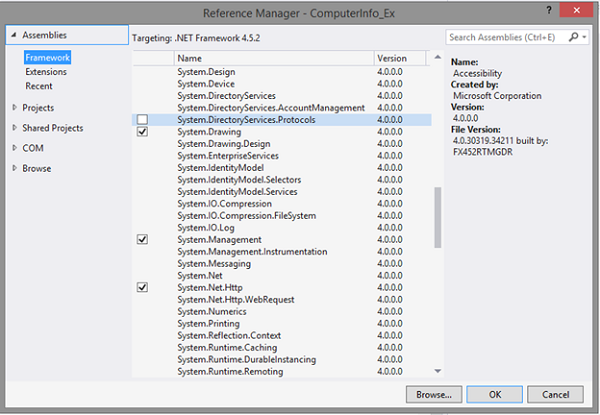
Figure 3: Add Reference
The preceding code accumulates all the desired information of the specified Windows32 class, and outputs it as a string. You now need to make use of the function from your remaining forms.
Form 2
Public Class Form2
   Private Sub Form2_Load(sender As Object, e As EventArgs) _
         Handles MyBase.Load

      TextBox1.Text = GetInfo("Win32_Processor")

   End Sub

End Class
Form 3
Public Class Form3
   Private Sub Form3_Load(sender As Object, e As EventArgs) _
         Handles Me.Load

      TextBox1.Text = GetInfo("Win32_LogicalDisk")

   End Sub

End Class
Form 4
Public Class Form4
   Private Sub Form4_Load(sender As Object, e As EventArgs) _
         Handles Me.Load

      TextBox1.Text = GetInfo("Win32_Keyboard")

   End Sub

End Class
Once run, your forms will display the following outputs:
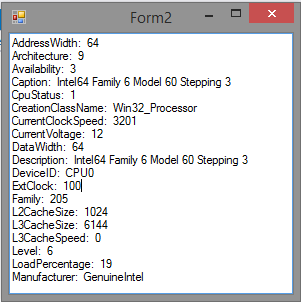
Figure 4: Processor
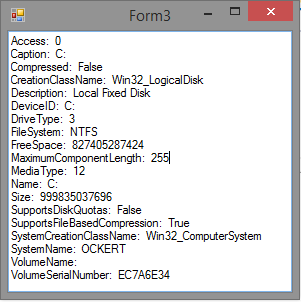
Figure 5: Logical Disk
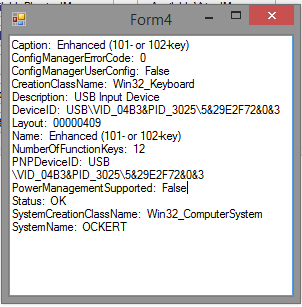
Figure 6: Keyboard
The code for this article is available on GitHub.
Conclusion
Knowing how to obtain and manipulate information from the Operating system is vital for large applications. Happy playing, and don’t break anything!