AJAX File Upload Progress for Java Using Commons and XML
Most of the browser-based applications created today seem to have one thing in common: AJAX. AJAX stands for Asynchronous JavaScript and XML. It does not matter what language the page is written in. It can be PHP, JSP, ASP, or simply straight HTML. Either way, AJAX will give your web page that “Fat Client” feel that previous browser-based applications could not achieve.
This article will cover how to upload a file to your web server using the Apache Commons FileUpload package as well as how to add AJAX to the page to give the user immediate feedback as to how their upload is doing.
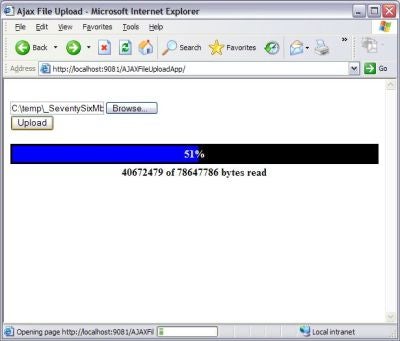
Figure 1: File uploading to server
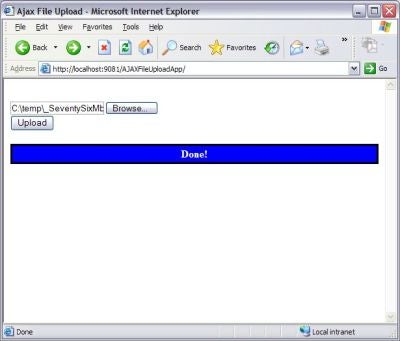
Figure 2: File finished uploading
To get started, you can create a basic skeleton version of your Servlet.
package com.psclistens.ajax.fileupload;

import java.io.File;
import java.io.IOException;
import java.io.PrintWriter;
import java.util.Iterator;
import java.util.List;
import javax.servlet.Servlet;
import javax.servlet.ServletException;
import javax.servlet.http.HttpServlet;
import javax.servlet.http.HttpServletRequest;
import javax.servlet.http.HttpServletResponse;
import javax.servlet.http.HttpSession;
import org.apache.commons.fileupload.FileItem;
import org.apache.commons.fileupload.FileItemFactory;
import org.apache.commons.fileupload.FileUploadException;
import org.apache.commons.fileupload.disk.DiskFileItemFactory;
import org.apache.commons.fileupload.servlet.ServletFileUpload;

/**
 * This is a File Upload Servlet that is used with AJAX
 * to monitor the progress of the uploaded file. It will
 * return an XML object containing the meta information
 * as well as the percent complete.
 */
public class FileUploadServlet
   extends HttpServlet
   implements Servlet
{
   private static final long serialVersionUID = 2740693677625051632L;

   public FileUploadServlet()
   {
      super();
   }

   protected void doGet(HttpServletRequest request,
                        HttpServletResponse response)
      throws ServletException, IOException
   {
   }

   protected void doPost(HttpServletRequest request,
                         HttpServletResponse response)
      throws ServletException, IOException
   {
   }
}
Now that the skeleton Servlet is complete, create your web.xml file and add your new Servlet to it.
<?xml version="1.0" encoding="UTF-8"?>
<web-app id="WebApp_ID" version="2.4"

   xmlns_xsi="http://www.w3.org/2001/XMLSchema-instance"
   xsi_schemaLocation="http://java.sun.com/xml/ns/j2ee
      http://java.sun.com/xml/ns/j2ee/web-app_2_4.xsd">
   <display-name>AJAXFileUploadApp</display-name>

   <servlet>
      <description>Servlet for file uploads</description>
      <display-name>File Upload Servlet</display-name>
      <servlet-name>>FileUploadServlet</servlet-name>
      <servlet-class>
         com.psclistens.ajax.fileupload.FileUploadServlet
      </servlet-class>
   </servlet>

   <servlet-mapping>
      <servlet-name>FileUploadServlet</servlet-name>
      <url-pattern>/servlet/FileUploadServlet</url-pattern>
   </servlet-mapping>

   <welcome-file-list>
      <welcome-file>fileUpload.html</welcome-file>
   </welcome-file-list>
</web-app>
Next, you need to create a class that implements ProgressListener. ProgressListener is a class in org.apache.commons.fileupload.
package com.psclistens.ajax.fileupload;

import org.apache.commons.fileupload.ProgressListener;

/**
 * This is a File Upload Listener that is used by Apache
 * Commons File Upload to monitor the progress of the
 * uploaded file.
 */
public class FileUploadListener
   implements ProgressListener
{
   private volatile long
      bytesRead = 0L,
      contentLength = 0L,
      item = 0L;

    public FileUploadListener()
   {
      super();
   }

   public void update(long aBytesRead, long aContentLength,
                      int anItem)
   {
      bytesRead = aBytesRead;
      contentLength = aContentLength;
      item = anItem;
   }

   public long getBytesRead()
   {
      return bytesRead;
   }

   public long getContentLength()
   {
      return contentLength;
   }

   public long getItem()
   {
      return item;
   }
}
So far, so good. Now, you need to create the doPost() method of your servlet. Add the following code to the method.
   protected void doPost(HttpServletRequest request,
                         HttpServletResponse response)
      throws ServletException, IOException
   {
      // create file upload factory and upload servlet
      FileItemFactory
         factory = new DiskFileItemFactory();
      ServletFileUpload
         upload = new ServletFileUpload(factory);

      // set file upload progress listener
      FileUploadListener
         listener = new FileUploadListener();

      HttpSession
         session = request.getSession();

      session.setAttribut("LISTENER", listener);

      // upload servlet allows to set upload listener
      upload.setProgressListener(listener);

      List
         uploadedItems = null;
      FileItem
         fileItem = null;
      String
         // Path to store file on local system
         filePath = "c:\\temp";

      try
      {
         // iterate over all uploaded files
         uploadedItems = upload.parseRequest(request);

         Iterator
            i = uploadedItems.iterator();

         while (i.hasNext())
         {
            fileItem = (FileItem) i.next();

            if (fileItem.isFormField() == false)
            {
               if (fileItem.getSize() > 0)
               {
                  File
                     uploadedFile = null;
                  String
                     myFullFileName = fileItem.getName(),
                     myFileName = "",
                     slashType = (myFullFileName.lastIndexOf("\\")
                        > 0) ? "\\" : "/";    // Windows or UNIX
                  int
                     startIndex =
                        myFullFileName.lastIndexOf(slashType);

                  // Ignore the path and get the filename
                  myFileName = myFullFileName.substring
                    (startIndex + 1, myFullFileName.length());

                  // Create new File object
                  uploadedFile = new File(filePath, myFileName);

                  // Write the uploaded file to the system
                  fileItem.write(uploadedFile);
               }
            }
         }
      }
      catch (FileUploadException e)
      {
         e.printStackTrace();
      }
      catch (Exception e)
      {
         e.printStackTrace();
      }
   }